> For the complete documentation index, see [llms.txt](https://ajaykumar-kanthi.gitbook.io/write-ups/llms.txt). Markdown versions of documentation pages are available by appending `.md` to page URLs; this page is available as [Markdown](https://ajaykumar-kanthi.gitbook.io/write-ups/hackthebox-cwes-track/htb-armaxis.md).

# HTB - Armaxis

<figure><img src="https://3740518612-files.gitbook.io/~/files/v0/b/gitbook-x-prod.appspot.com/o/spaces%2FOH84nxPA0OhkjhNX692h%2Fuploads%2FXzi0vG62E6CWH9GZCK4M%2Fimage.png?alt=media&amp;token=f3a85c74-ee3a-4adf-99ee-2afb19c56cc6" alt=""><figcaption></figcaption></figure>

the zip file password protected use the password provided to unzip the file.

<figure><img src="https://3740518612-files.gitbook.io/~/files/v0/b/gitbook-x-prod.appspot.com/o/spaces%2FOH84nxPA0OhkjhNX692h%2Fuploads%2F2hSDW8LO6gRP3U1eRuK9%2Fimage.png?alt=media&amp;token=9d8ea01b-88e3-44f8-b78b-8b5330a02cfb" alt=""><figcaption></figcaption></figure>

<figure><img src="https://3740518612-files.gitbook.io/~/files/v0/b/gitbook-x-prod.appspot.com/o/spaces%2FOH84nxPA0OhkjhNX692h%2Fuploads%2FzlisFSoa9ocT73cxbych%2Fimage.png?alt=media&amp;token=abc3f3ba-df49-4707-af6d-14d6026b23eb" alt=""><figcaption></figcaption></figure>

there is a database file in the challenge directory.

<figure><img src="https://3740518612-files.gitbook.io/~/files/v0/b/gitbook-x-prod.appspot.com/o/spaces%2FOH84nxPA0OhkjhNX692h%2Fuploads%2FoSIReuQie7QIglvq6Ymo%2Fimage.png?alt=media&amp;token=46afc749-6fa0-4c72-824c-a257cd44a002" alt=""><figcaption></figcaption></figure>

the database file leaks the admin user name

<figure><img src="https://3740518612-files.gitbook.io/~/files/v0/b/gitbook-x-prod.appspot.com/o/spaces%2FOH84nxPA0OhkjhNX692h%2Fuploads%2Fs8JPKla2x6G9azgxY0sW%2Fimage.png?alt=media&amp;token=1fdfda92-6a17-4fa1-85ab-3ed8a6702b7e" alt=""><figcaption></figcaption></figure>

### HTTP

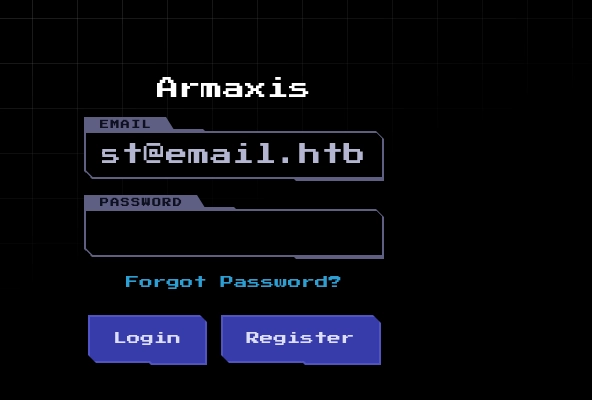
that said browsing to the given ip addresses leak a login page with reset functionality and email access page of <test@email.htb>

<figure><img src="https://3740518612-files.gitbook.io/~/files/v0/b/gitbook-x-prod.appspot.com/o/spaces%2FOH84nxPA0OhkjhNX692h%2Fuploads%2FmRdF6G47FVFVb5kSODAc%2Fimage.png?alt=media&amp;token=aaf7abfa-70e8-444f-ac4f-355afd1ff4e0" alt=""><figcaption></figcaption></figure>

<figure><img src="https://3740518612-files.gitbook.io/~/files/v0/b/gitbook-x-prod.appspot.com/o/spaces%2FOH84nxPA0OhkjhNX692h%2Fuploads%2FA5FwMAVrAuOsBiM52bFD%2Fimage.png?alt=media&amp;token=43474747-d7c8-4e75-97bc-fcbba3e0fe36" alt=""><figcaption></figcaption></figure>

observing the password reset functionality source code leak a vulnerability

```powershell
router.post("/reset-password", async (req, res) => {
  const { token, newPassword, email } = req.body;
  ...
  const reset = await getPasswordReset(token);       // looks up token only
  if (!reset) return res.status(400).send("Invalid or expired token.");

  const user = await getUserByEmail(email);           // <-- separate lookup, unrelated to `reset`
  ...
  await updateUserPassword(user.id, newPassword);      // updates whichever user `email` points to
```

`reset` (found via `token`) is never cross-checked against `email`. The code confirms the token is *valid* (exists, not expired) but never confirms it belongs to the account being reset. So:

* Register your own account (`you@email.htb`)
* Call `/reset-password/request` with your own email → you legitimately receive a valid, unexpired token (via the MailHog inbox you already have working, since it's hardcoded to `test@email.htb` so register/reset using `test@email.htb` as your account email to actually receive it)
* Then call `/reset-password` with:
  * `token` = the token you received
  * `email` = `admin@armaxis.htb`
  * `newPassword` = whatever you want

Since `getPasswordReset(token)` only validates the token itself and `getUserByEmail(email)` is looked up independently, this resets **admin's** password to your chosen value  full auth bypass / account takeover, no admin email interaction needed.

### Resetting the admin password via IDOR

First register a account as <test@email.htb>

<figure><img src="https://3740518612-files.gitbook.io/~/files/v0/b/gitbook-x-prod.appspot.com/o/spaces%2FOH84nxPA0OhkjhNX692h%2Fuploads%2F1ZMqn7YEbxtIJQW0D34s%2Fimage.png?alt=media&amp;token=4bb55a7d-2d9a-425f-be94-5883093f0e48" alt=""><figcaption></figcaption></figure>

<figure><img src="https://3740518612-files.gitbook.io/~/files/v0/b/gitbook-x-prod.appspot.com/o/spaces%2FOH84nxPA0OhkjhNX692h%2Fuploads%2Fpgz84NYjnimsD24KX5Nf%2Fimage.png?alt=media&amp;token=55a6d4d8-73d1-4ca3-8133-e4398379e2ec" alt=""><figcaption></figcaption></figure>

use the reset functionality to send a reset token.

<figure><img src="https://3740518612-files.gitbook.io/~/files/v0/b/gitbook-x-prod.appspot.com/o/spaces%2FOH84nxPA0OhkjhNX692h%2Fuploads%2Fvx9d4DtHhg8kBBtDhhOm%2Fimage.png?alt=media&amp;token=01d8a886-d8dc-4b64-a540-888823885aa6" alt=""><figcaption></figcaption></figure>

observing the email page we get a token to reset.

<figure><img src="https://3740518612-files.gitbook.io/~/files/v0/b/gitbook-x-prod.appspot.com/o/spaces%2FOH84nxPA0OhkjhNX692h%2Fuploads%2FvawD9L1gTeYWVbmic1Xq%2Fimage.png?alt=media&amp;token=6eba8a42-245d-45d8-b264-dbdb5d6e3259" alt=""><figcaption></figcaption></figure>

use the token for resetting

<figure><img src="https://3740518612-files.gitbook.io/~/files/v0/b/gitbook-x-prod.appspot.com/o/spaces%2FOH84nxPA0OhkjhNX692h%2Fuploads%2FufNGDjy9Kco1ayjU2Tz6%2Fimage.png?alt=media&amp;token=99215f70-ea5f-4023-8a56-d1fd527ded12" alt=""><figcaption></figcaption></figure>

<figure><img src="https://3740518612-files.gitbook.io/~/files/v0/b/gitbook-x-prod.appspot.com/o/spaces%2FOH84nxPA0OhkjhNX692h%2Fuploads%2FYSbN8lnsyVayJjwBo8qJ%2Fimage.png?alt=media&amp;token=a818f12e-6187-485c-b6ed-390e29229b4a" alt=""><figcaption></figcaption></figure>

change the email address to admin email and click forward this resets the admin user password.

<figure><img src="https://3740518612-files.gitbook.io/~/files/v0/b/gitbook-x-prod.appspot.com/o/spaces%2FOH84nxPA0OhkjhNX692h%2Fuploads%2Fn0sP17KYriGnLkhRJjJi%2Fimage.png?alt=media&amp;token=b80b520a-0a2f-4620-a332-617db02da648" alt=""><figcaption></figcaption></figure>

and it worked admin password is reset. we can use that to login.

<figure><img src="https://3740518612-files.gitbook.io/~/files/v0/b/gitbook-x-prod.appspot.com/o/spaces%2FOH84nxPA0OhkjhNX692h%2Fuploads%2Fs0lMqmrvnlGZEueg92GN%2Fimage.png?alt=media&amp;token=24f67b5c-c623-4127-a11d-2e2edc530286" alt=""><figcaption></figcaption></figure>

<figure><img src="https://3740518612-files.gitbook.io/~/files/v0/b/gitbook-x-prod.appspot.com/o/spaces%2FOH84nxPA0OhkjhNX692h%2Fuploads%2FRSYNQRr12Zac4NsyfZZh%2Fimage.png?alt=media&amp;token=66005e9e-7bbb-4799-b6ba-570d5bf1dbfc" alt=""><figcaption></figcaption></figure>

<figure><img src="https://3740518612-files.gitbook.io/~/files/v0/b/gitbook-x-prod.appspot.com/o/spaces%2FOH84nxPA0OhkjhNX692h%2Fuploads%2FXGgnTQfsr7ncZBPF5cBP%2Fimage.png?alt=media&amp;token=f16468cc-11a4-4a74-a5b0-4597c4eee048" alt=""><figcaption></figcaption></figure>

there is a dispatch functionality available for admin.

enumerating the source code revealed a command injection vulnerability

<figure><img src="https://3740518612-files.gitbook.io/~/files/v0/b/gitbook-x-prod.appspot.com/o/spaces%2FOH84nxPA0OhkjhNX692h%2Fuploads%2FDox4kB1sp5HCPpfVcoKn%2Fimage.png?alt=media&amp;token=e9108318-b547-4569-ad0e-ab4ca6915e9f" alt=""><figcaption></figcaption></figure>

The url comes straight out of the markdown image syntax !alt in the note field, and it's interpolated directly into a shell command string passed to execSync. No sanitization, no escaping, no allowlist on the URL. Since execSync runs via /bin/sh -c, anything with shell metacharacters (;, |, \`, $(), &&) in that "URL" gets executed as a separate/chained command.

### Command execution via /dispatch&#x20;

<figure><img src="https://3740518612-files.gitbook.io/~/files/v0/b/gitbook-x-prod.appspot.com/o/spaces%2FOH84nxPA0OhkjhNX692h%2Fuploads%2FxMJsTeeiIOv05590hJ0a%2Fimage.png?alt=media&amp;token=0e257120-5abe-4962-895f-b62152f3b266" alt=""><figcaption></figcaption></figure>

<figure><img src="https://3740518612-files.gitbook.io/~/files/v0/b/gitbook-x-prod.appspot.com/o/spaces%2FOH84nxPA0OhkjhNX692h%2Fuploads%2FjdpQHaSw4f49tV31qhDF%2Fimage.png?alt=media&amp;token=79aa5897-8469-4ab9-84c8-b57efe81642b" alt=""><figcaption></figcaption></figure>

<figure><img src="https://3740518612-files.gitbook.io/~/files/v0/b/gitbook-x-prod.appspot.com/o/spaces%2FOH84nxPA0OhkjhNX692h%2Fuploads%2FRLmkIJkGWuoxbdkT26VI%2Fimage.png?alt=media&amp;token=fbdb2016-ef53-40d3-84f1-a32b037eea9c" alt=""><figcaption></figcaption></figure>

<figure><img src="https://3740518612-files.gitbook.io/~/files/v0/b/gitbook-x-prod.appspot.com/o/spaces%2FOH84nxPA0OhkjhNX692h%2Fuploads%2F7r58WmFgvW38vHHk1GY4%2Fimage.png?alt=media&amp;token=e4c98efd-5d5a-477b-a182-3d3c25b9c23f" alt=""><figcaption></figcaption></figure>

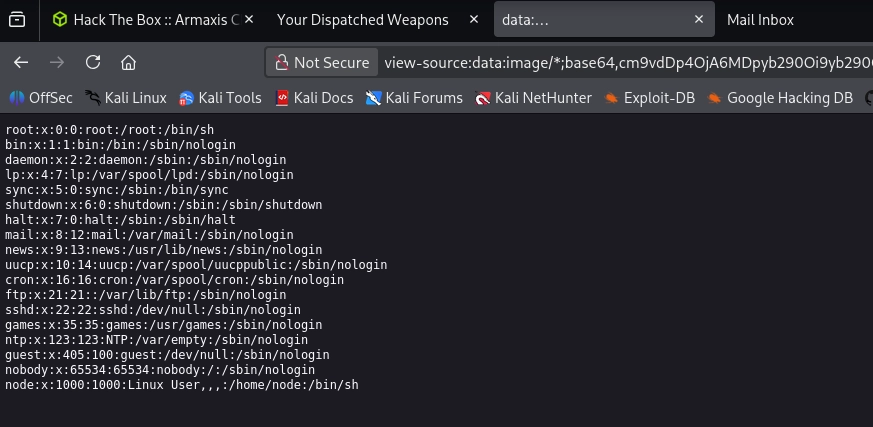
similarly i can read the flag.txt

<figure><img src="https://3740518612-files.gitbook.io/~/files/v0/b/gitbook-x-prod.appspot.com/o/spaces%2FOH84nxPA0OhkjhNX692h%2Fuploads%2Fy8dwRCQtViaEFbq9eAUE%2Fimage.png?alt=media&amp;token=7969ea0a-8da2-43bb-a021-63b990660198" alt=""><figcaption></figcaption></figure>

<figure><img src="https://3740518612-files.gitbook.io/~/files/v0/b/gitbook-x-prod.appspot.com/o/spaces%2FOH84nxPA0OhkjhNX692h%2Fuploads%2FZdBdCNxgVM6fsNbM4nFy%2Fimage.png?alt=media&amp;token=c55a97f2-7895-4cb2-8128-5502913559f1" alt=""><figcaption></figcaption></figure>

<figure><img src="https://3740518612-files.gitbook.io/~/files/v0/b/gitbook-x-prod.appspot.com/o/spaces%2FOH84nxPA0OhkjhNX692h%2Fuploads%2FTamHkdKCGm1LWfmDBfZ2%2Fimage.png?alt=media&amp;token=27d770cc-948a-4f54-b3b0-e89685397f2a" alt=""><figcaption></figcaption></figure>

<figure><img src="https://3740518612-files.gitbook.io/~/files/v0/b/gitbook-x-prod.appspot.com/o/spaces%2FOH84nxPA0OhkjhNX692h%2Fuploads%2FR9sKNvEsVy5uWmCPP8DX%2Fimage.png?alt=media&amp;token=26150ba8-39e9-4788-b355-eeada623df09" alt=""><figcaption></figcaption></figure>


---

# Agent Instructions
This documentation is published with GitBook. GitBook is the documentation platform designed so that both humans and AI agents can read, navigate, and reason over technical content effectively. Learn more at gitbook.com.

## Querying This Documentation
If you need additional information that is not directly available in this page, you can query the documentation dynamically by asking a question.

Perform an HTTP GET request on the current page URL with the `ask` query parameter, and the optional `goal` query parameter:

```
GET https://ajaykumar-kanthi.gitbook.io/write-ups/hackthebox-cwes-track/htb-armaxis.md?ask=<question>&goal=<endgoal>
```

`ask` is the immediate question: it should be specific, self-contained, and written in natural language.
`goal` is optional and describes the broader end goal you are ultimately trying to accomplish on behalf of the user. GitBook uses it to tailor the answer towards what is most useful for that goal.

The response will contain a direct answer to the question and relevant excerpts and sources from the documentation.

Use this mechanism when the answer is not explicitly present in the current page, you need clarification or additional context, or you want to retrieve related documentation sections.